

绿色版下载:
ArcGIS CityEngine2025.1绿色版(英文)-ArcGIS CityEngine下载
What’s new in CityEngine 2025.1 CityEngine 2025.1 中的新功能
Be sure to read the CityEngine 2025.1 release notes for all the details on new features, enhancements, and bug fixes. Visit My Esri to upgrade to CityEngine 2025.1.请务必阅读CityEngine 2025.1 发行说明</b0,了解所有新功能、增强功能和错误修复的详细信息。访问My Esri以升级到CityEngine 2025.1。
Are you new to CityEngine? Try it out with a fully-functional free-trial version.您是CityEngine的新用户吗?可以试用功能齐全的免费试用版。
Also, check out the CityEngine 2025.1 video highlights.另外,查看CityEngine 2025.1视频亮点。
CGA: Geometry modifications CGA:几何修改
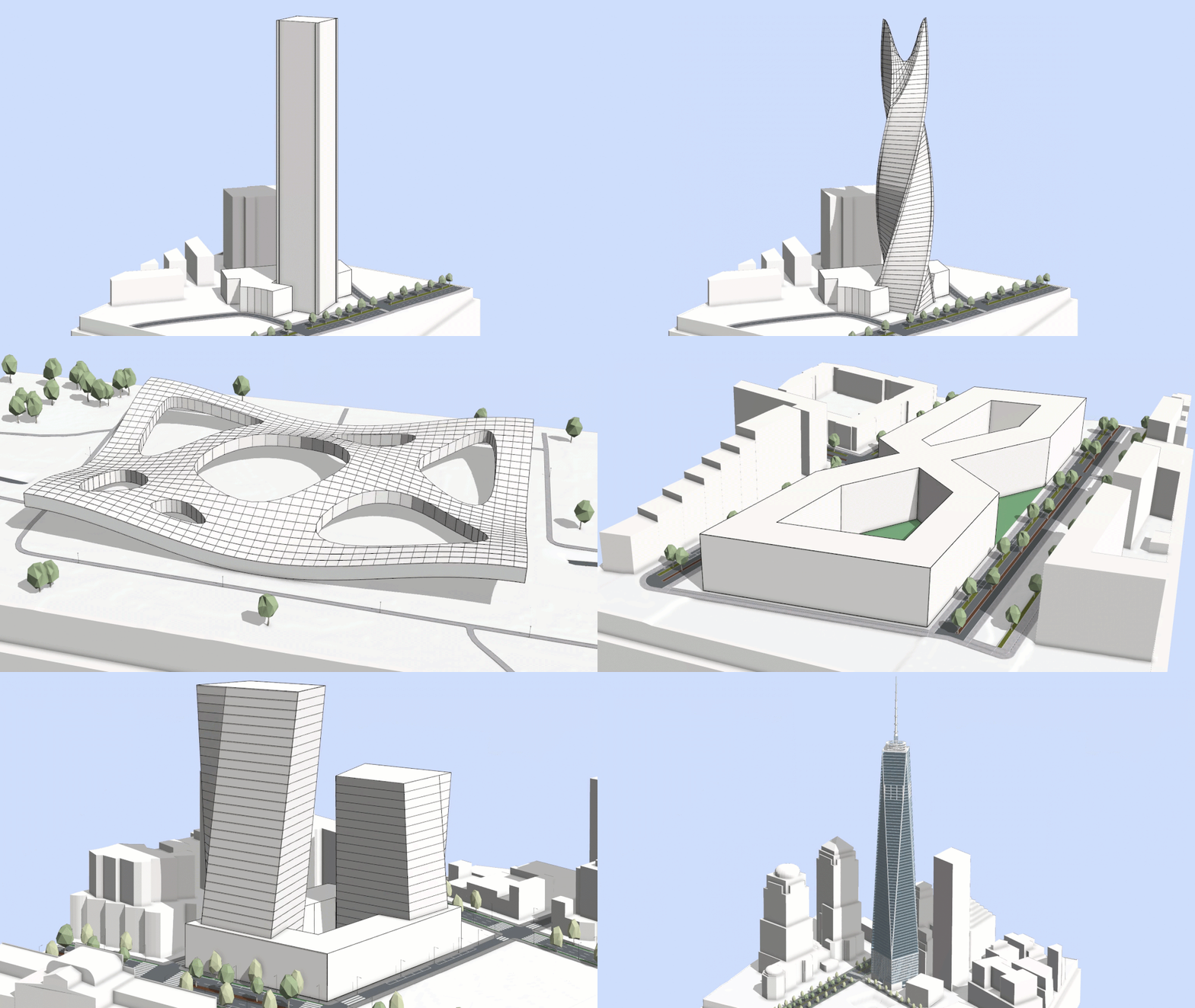
Traditionally, CGA rules allowed you to construct and manipulate geometry only through built-in operations, often resulting in rigid, orthogonal forms. Now, we are entering a new era with novel geometry modification capabilities, enabling you to transform geometry components and recombine subdivided shapes directly within CGA. Create beautiful designs with intricate layouts, custom massing models, and complex roofs. With these improvements, procedural modeling continues to evolve in-step with the expressive needs of contemporary architecture.传统上,CGA规则只允许通过内置操作来构建和操纵几何体,这往往会产生僵硬的正交形式。现在,我们正迈入一个拥有新型几何修改能力的新时代,使您能够直接在CGA中转换几何组件并重新组合细分后的形状。您可以创建具有复杂布局、自定义体量模型和复杂屋顶的精美设计。随着这些改进,程序性建模将继续发展,以满足当代建筑的表达需求。
New features:新功能:
- The new modify operation allows you to manipulate selected parts of the geometry, for example with transformations or splits, and then reconnects the edited parts with the original mesh topology.新的修改操作允许你处理几何体的选定部分(例如通过变换或分割),然后将编辑后的部分与原始网格拓扑重新连接。
- The new recompose strategy for inline can be used to directly reconnect subdivided shapes. For example, splitting a surface into a connected grid and then applying modify to move the new vertices into a parametric surface.新的内联重组策略可用于直接重新连接细分后的形状。例如,将一个曲面分割成相连的网格,然后应用修改操作将新顶点移动到参数化曲面中。
Example: Contemporary Architecture Park示例:当代建筑公园
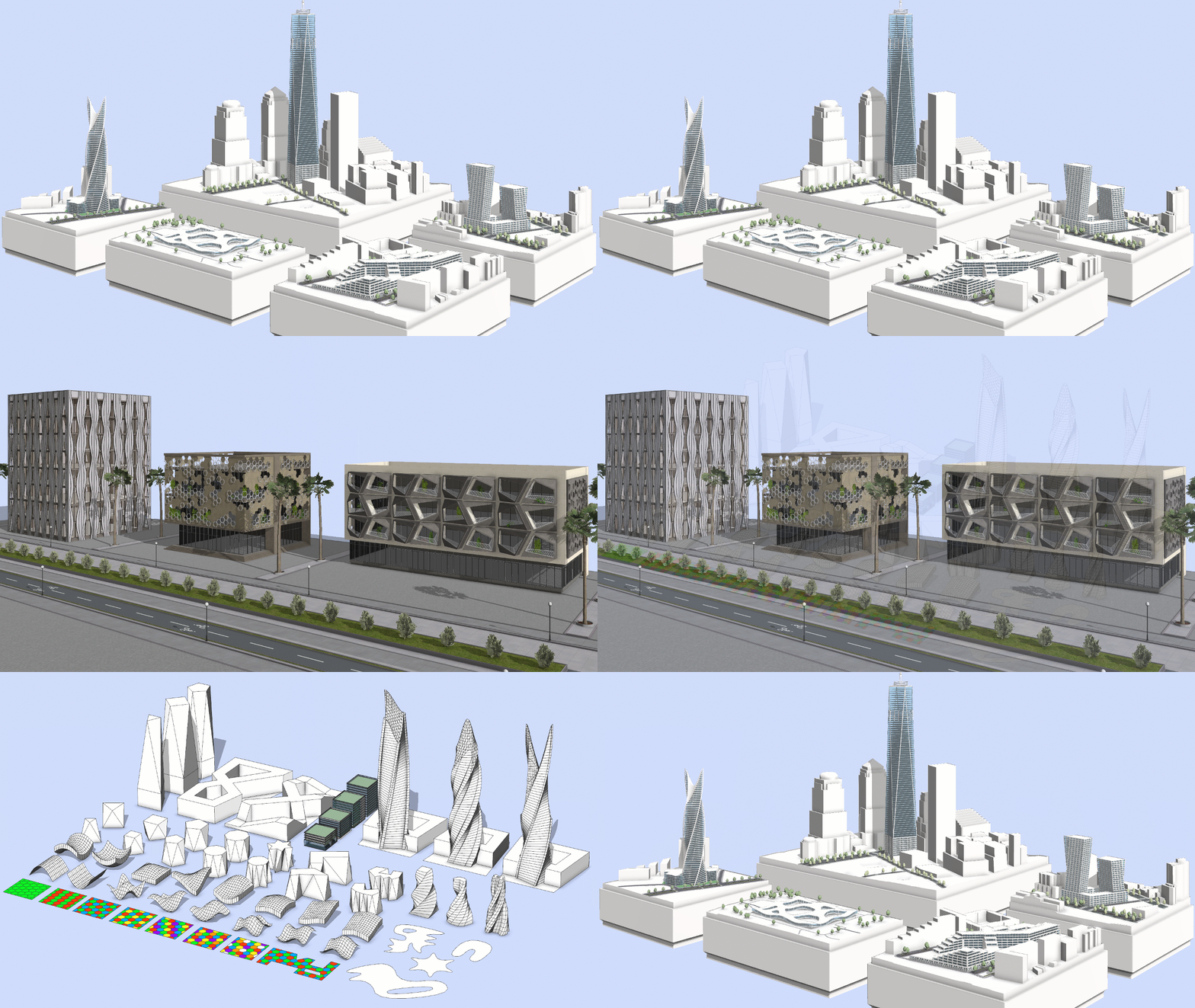
The new CityEngine Example demonstrates the latest CGA capabilities through a collection of buildings and facades inspired by contemporary architecture and provides novel out-of-the-box procedural content:新的CityEngine示例通过一系列受当代建筑启发的建筑和立面,展示了最新的CGA功能,并提供了新颖的开箱即用的程序化内容:
- Mass Models: Explore dynamic, sculptural building forms made possible using geometry modifications.体量模型:探索通过几何修改实现的动态、雕塑般的建筑形态。
- Facades: Discover contemporary facade designs with hexagonal patterns, twists, and perforations.立面:探索具有六边形图案、扭曲和穿孔的现代立面设计。
- Components: Reuse the core building blocks that power the examples.组件:重复使用为示例提供支持的核心构建块。
More details can be found online. The example is also available for download directly within CityEngine 2025.1 at Help > Download Tutorials and Examples in the main menu.更多详情可在线上查看。该示例也可直接在CityEngine 2025.1中下载,具体路径为:主菜单中的“帮助 > 下载教程和示例”。
Visual CGA: No-code building facades可视化CGA:无代码建筑立面
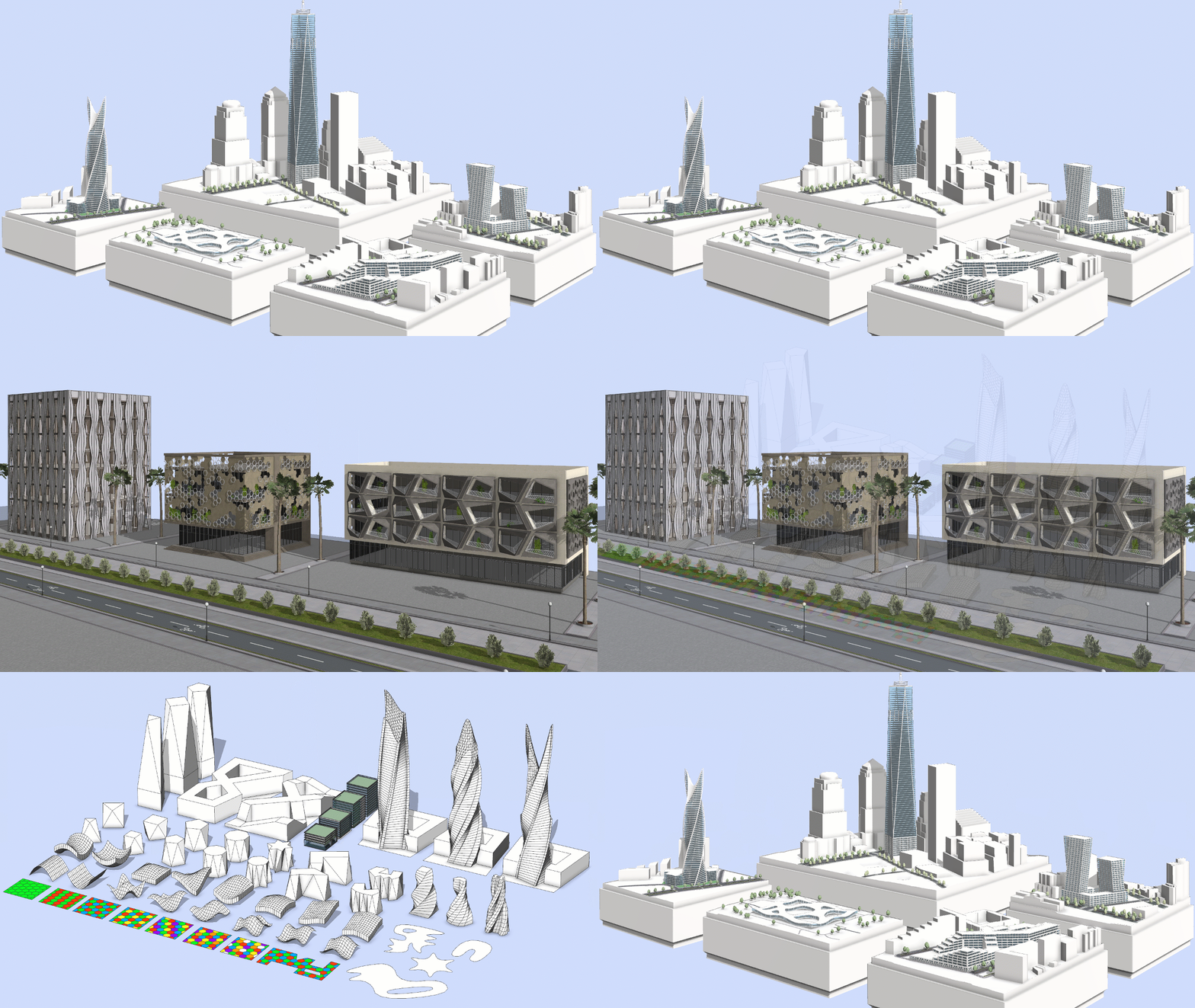

With the addition of facade components to ESRI.lib, planners and designers can now turn schematic massing studies into realistic visualizations.随着ESRI.lib中新增了外观组件,规划人员和设计师现在可以将示意性的体量研究转化为逼真的可视化效果。
Through visual programming and the growing component library, procedural modelling of rich facades is now simplified and does not require any programming knowledge.借助可视化编程和不断扩充的组件库,丰富立面的程序化建模如今已得到简化,并且无需任何编程知识。
You can now split massing volumes into floors, arrange facade patterns, and add out-of-the box architectural elements, such as windows or shading devices, to create a complete and realistic building design.现在,你可以将体量分割为楼层,布置立面图案,并添加现成的建筑元素(如窗户或遮阳装置),从而创建完整且逼真的建筑设计。
The Visual CGA Editor now includes powerful new features that make it both more capable and convenient to use. With parameter connections, you can share information between components, such as floor numbers or window heights, unlocking greater variety and control in your procedural designs. Furthermore, the Visual CGA Editor now includes built-in documentation. Each component provides immediate access to a general description, and tooltips explain each attribute slot and extension point.Visual CGA编辑器现在新增了强大的功能,使其不仅功能更强大,使用也更便捷。通过参数连接,您可以在组件之间共享信息,例如楼层号或窗户高度,从而在程序性设计中获得更多样化的效果和更精准的控制。此外,Visual CGA编辑器现在还包含内置文档。每个组件都能让您直接获取其通用描述,而工具提示则会解释每个属性槽和扩展点。
Street Designer: More lane information街道设计工具:更多车道信息

Street Designer continues to improve. To enhance the distinction between the roadbed lanes and the sidewalk shapes, the sidewalk shapes are now displayed in a slightly darker shade. Additionally, the separator lines between the sidewalk shapes and roadbed lanes are highlighted when the Street Designer tools are active.Street Designer 持续改进。为增强路基车道与人行道形状之间的区分度,人行道形状现在以稍深的色调显示。此外,当 Street Designer 工具处于激活状态时,人行道形状与路基车道之间的分隔线会被高亮显示。
We refined the Street Designer pointer icons in the Viewport window to make it easier to understand the currently active tool. The minimum lane width is now 0.1 meters for both the Edit Lane tool and the Lane Parameters section in the Inspector window.我们优化了视口窗口中的“街道设计器”指针图标,以便更轻松地识别当前激活的工具。现在,编辑车道工具和检查器窗口中的车道参数部分的最小车道宽度均为0.1米。
Enhanced object attributes 增强的对象属性

Visualizing a lane appropriately means understanding its intended use, direction, width, and how it relates to adjacent lanes within a shared segment. To enhance this design process, we’ve now added object attributes that display lane characteristics and their position relative to other lanes in the same segment. You can also determine whether a lane belongs to the roadbed or sidewalk group; these attributes automatically update as you edit or move lanes. This feature promotes a more informed and context-aware street design. Additionally, if you’re customizing your own CGA lane rules, now there are advanced detailing options for lane markings. From there, as introduced in CityEngine 2025.0, you can save the design as a new custom street configuration to reuse later.恰当地可视化车道意味着理解其预期用途、方向、宽度,以及它在共享路段中与相邻车道的关系。为了改进这一设计流程,我们现在添加了对象属性,用于显示车道特征及其在同一路段中相对于其他车道的位置。你还可以确定车道属于路基组还是人行道组;这些属性会在你编辑或移动车道时自动更新。此功能有助于打造更合理且贴合场景的街道设计。此外,如果你正在自定义自己的CGA车道规则,现在有用于车道标线的高级细节选项。在此基础上,正如在CityEngine 2025.0中所介绍的,你可以将设计保存为新的自定义街道配置,以便日后重用。
Object Attributes have also been enhanced for lanes created using the Get Map Data OSM import. A new osm_derived_lane_category allows you to query lanes by usage types including Vehicle, Bus, Bike, and Pedestrian.对于使用获取地图数据OSM导入创建的车道,其对象属性也得到了增强。新增的osm_derived_lane_category允许您按使用类型查询车道,包括机动车道、公交专用道、自行车道和人行道。
Explore how these new categories are applied in the new Generic_Lane_for_OSM_Import CGA rule available in the latest ESRI.lib release. This rule is assigned by default for OSM street imports. With this update, Get Map Data has never been closer to reality.了解这些新类别在最新ESRI.lib版本中提供的新Generic_Lane_for_OSM_Import CGA规则中是如何应用的。此规则是OSM街道导入的默认分配规则。通过此次更新,“获取地图数据”功能与现实的差距从未如此之小。
Sorting options for street configurations街道配置的排序选项
We added sorting options for Street Configurations: Recently used, Recently added, or Highest width. Also, there is now a list view which stacks the configurations vertically, allowing for better readability of longer names. You can find it directly on the right side of the new sorting option.我们为街道配置添加了排序选项:最近使用、最近添加或宽度最大。此外,现在还提供了列表视图,将配置垂直堆叠,便于阅读较长的名称。您可以在新排序选项的右侧直接找到该视图。
Improved performance and street geometry改进的性能和街道几何形状
Several measures were taken to improve performance when working with streets and Street Designer, leading to much smoother editing. We also made the street geometry around intersections more robust by reducing the amount of small triangle shapes and by preventing tiny visual gaps at the border between intersections and lanes.我们采取了多项措施来提升处理街道和使用Street Designer时的性能,使编辑过程更加流畅。我们还通过减少小三角形的数量以及防止交叉路口和车道之间的边界出现微小的视觉间隙,增强了交叉路口周围街道几何形状的稳定性。
Introducing the Python 3 API (Beta)介绍Python 3 API(测试版)
Python 3 transforms our Python integration from a closed automation tool into an open platform for developers to build custom solutions and applications using the CityEngine API.Python 3 将我们的 Python 集成从一个封闭的自动化工具转变为一个开放平台,供开发者使用 CityEngine API 构建定制解决方案和应用程序。
You can now integrate CityEngine with other Esri APIs such as ArcPy and the ArcGIS API for Python, as well as with thousands of third-party libraries. This enables diverse use cases including street network analyses, AI-powered scene modifications, and custom UI data entry forms.现在,您可以将CityEngine与其他Esri API(如ArcPy和ArcGIS Python API)以及数千个第三方库集成。这支持多种使用场景,包括街道网络分析、人工智能驱动的场景修改以及自定义用户界面数据输入表单。
A new UI allows you to manage multiple Python interpreters and virtual environments. Projects and the interactive Python Console can each be configured to use specific interpreters or virtual environments. See Working with Python 3 for more information.新的用户界面允许你管理多个Python解释器和虚拟环境。项目和交互式Python控制台都可以配置为使用特定的解释器或虚拟环境。有关更多信息,请参见使用Python 3。
The Python 3 API and its supporting UI are available in beta. See the list of known limitations.Python 3 API及其配套用户界面已处于测试阶段。请查看已知限制列表。
Tutorials and documentation 教程和文档

We updated our current tutorial series catalog with new content and improved visuals:我们用新内容和改进的视觉效果更新了当前的教程系列目录:
- Try ArcGIS CityEngine 尝试 ArcGIS CityEngine
- Learn about ArcGIS CityEngine integration了解ArcGIS CityEngine的集成
- Discover ArcGIS CityEngine in real-world scenarios在实际场景中探索ArcGIS CityEngine
We expanded our catalog with two new tutorial series, each offering a sequence of tutorials with step-by-step guidance through essential CityEngine workflows:我们在目录中新增了两个新的教程系列,每个系列都包含一系列教程,通过逐步指导介绍CityEngine的基本工作流程:
- Learn procedural modeling with CGA 学习使用CGA进行程序化建模
Learn how to write CGA rules to generate attribute-driven and adaptable 3D models in real time.了解如何编写CGA规则,以实时生成由属性驱动且具有适应性的3D模型。
- Import data in ArcGIS CityEngine 在ArcGIS CityEngine中导入数据
Learn how to import, clean-up, calculate, format, and report data in your ArcGIS CityEngine projects.了解如何在您的ArcGIS CityEngine项目中导入、清理、计算、格式化和报告数据。
We refurbished the following tutorials by adding fresh workflows and updated visuals:我们通过添加全新的工作流和更新的视觉效果,对以下教程进行了翻新:
- Tutorial 10: Python scripting 教程10:Python脚本
Updated the scripts in the project and documentation to follow better coding practices and removed the Change Street Widths subsection due to incompatibility with Street Designer.更新了项目中的脚本和文档,以遵循更好的编码规范,并因与街道设计器不兼容而移除了“更改街道宽度”子部分。
- Tutorial 14b: Modeling on terrain 教程14b:地形建模
Learn the essentials of modeling streets and shapes on terrain.学习在地形上建模街道和形状的基本要点。
- Tutorial 21: CSV import 教程21:CSV导入
Learn how to import data from a .csv file and use it in CGA code arrays.了解如何从.csv文件导入数据并在CGA代码数组中使用它。





没有回复内容