

ArcGIS Drone2Map 2025.2 中的新功能
The latest release of ArcGIS Drone2Map is here—and it’s packed with powerful new features and enhancements to take your drone mapping workflows even further. In this blog, we’re highlighting some of the most exciting updates. For the full list of improvements, check out our help documentation.最新版本的ArcGIS Drone2Map现已发布,其中包含强大的新功能和增强功能,可进一步优化您的无人机测绘工作流程。在本篇博客中,我们将重点介绍一些最令人兴奋的更新。有关完整的改进列表,请查看我们的帮助文档。
Gaussian Splat layers provide realistic 3D visualization高斯喷溅图层可提供逼真的3D可视化效果
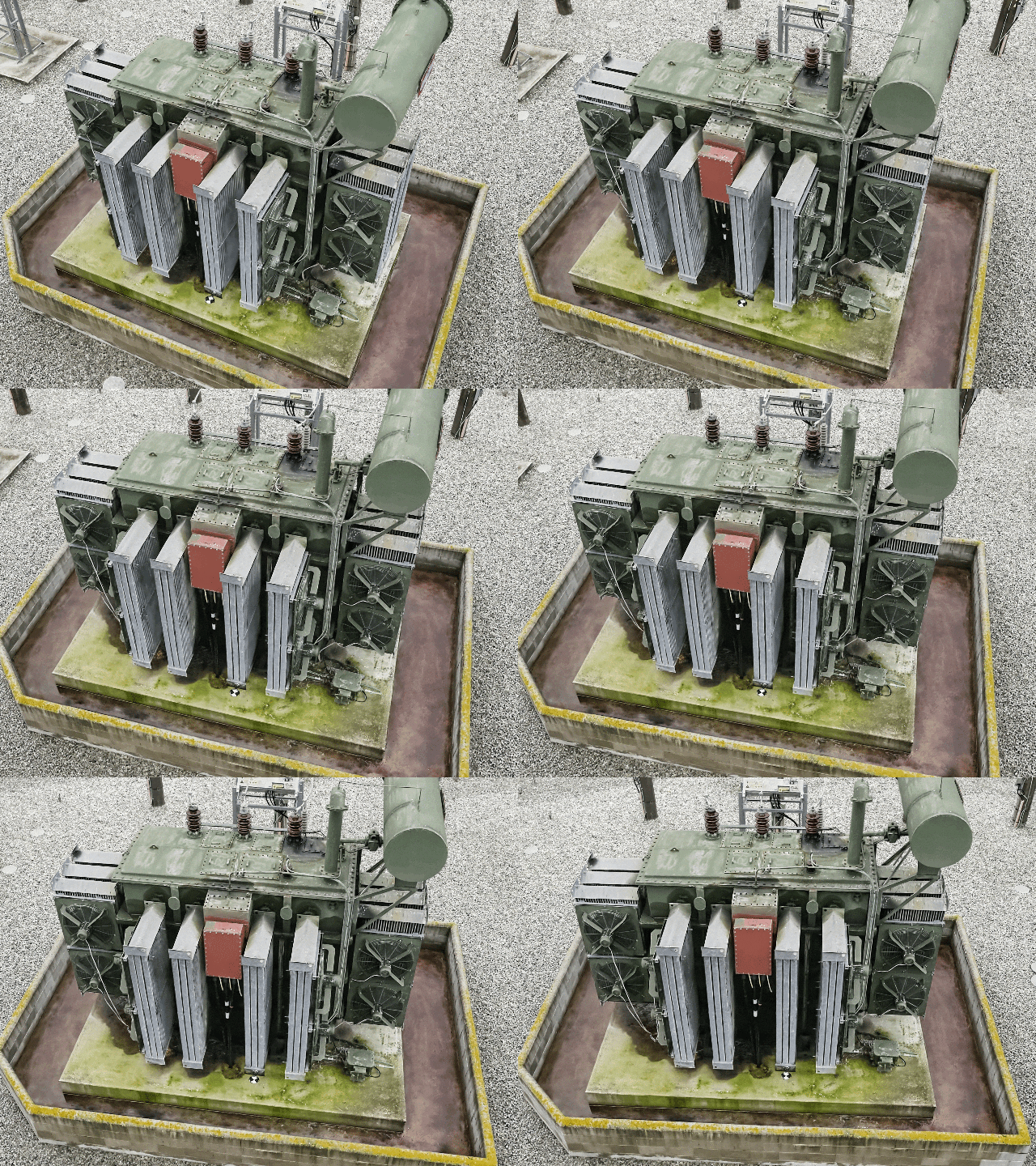
Drone2Map now supports Gaussian Splats, a new 3D layer that brings highly realistic detail to your 3D maps, such as the following:Drone2Map 现在支持高斯泼溅,这是一种新的 3D 图层,可为您的 3D 地图带来高度逼真的细节,例如:
- Utilities and telecom teams can see cables and pipes more clearly to improve planning and maintenance.公用事业和电信团队可以更清晰地查看电缆和管道,从而改进规划和维护工作。
- Transportation agencies can inspect bridges, railways, and roads in lifelike detail.交通部门可以以逼真的细节检查桥梁、铁路和道路。
- Natural resource teams can identify vegetation and terrain down to the species level.自然资源团队能够识别植被和地形,精确到物种层面。
- Urban planners can showcase immersive cityscapes with reflections and transparency that shift as the viewer moves—ideal for public engagement and collaboration.城市规划师可以展示沉浸式的城市景观,其中的倒影和透明度会随着观者的移动而变化,非常适合公众参与和协作。
These layers offer new possibilities for many other industries as well, helping teams visualize complex environments with greater clarity and context.这些图层也为许多其他行业提供了新的可能性,帮助团队更清晰、更全面地可视化复杂环境。
Automatic detection and linking of control point markers控制点标记的自动检测与链接
ArcGIS Drone2Map now uses deep learning libraries to automatically detect supported control point markers within input imagery and link them across multiple source images. This eliminates the manual linking step, saving valuable time. This is especially helpful when working with large datasets or under tight delivery timelines. By streamlining this critical part of the workflow, you can more easily achieve high-accuracy outputs with less effort.ArcGIS Drone2Map现在利用深度学习库,在输入影像中自动检测支持的控制点标记,并在多个源图像之间建立关联。这省去了手动关联步骤,节省了宝贵时间。在处理大型数据集或面临紧迫交付期限时,这一点尤其有用。通过简化工作流程中的这一关键环节,您能够更轻松地以更少的精力获得高精度输出。
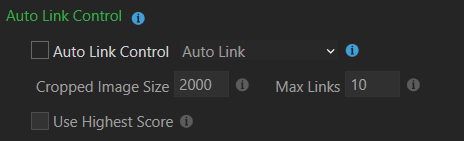
There are two ways to accomplish this:有两种方法可以实现这一点:
Auto Link—Automatically links control points across images but does not include them in the adjustment. This option allows you to review and edit links manually before rerunning the adjustment process.自动链接——自动链接图像间的控制点,但不将它们包含在调整中。此选项允许您在重新运行调整过程之前手动检查和编辑链接。
Auto Link and Adjust—Automatically links control points and incorporates them directly into the adjustment. This is ideal when marker detection is reliable, enabling linking, adjustment, and product creation in a single processing run.自动链接与调整——自动链接控制点并将其直接纳入调整过程。当标记检测可靠时,这是理想选择,可在单次处理运行中完成链接、调整和产品创建。

To learn more about the types of supported control markers, see Auto link control.要了解更多受支持的控制点标记类型,请参见自动链接控制。
Improved complete True Orthos of critical areas改进的关键区域完整正射影像
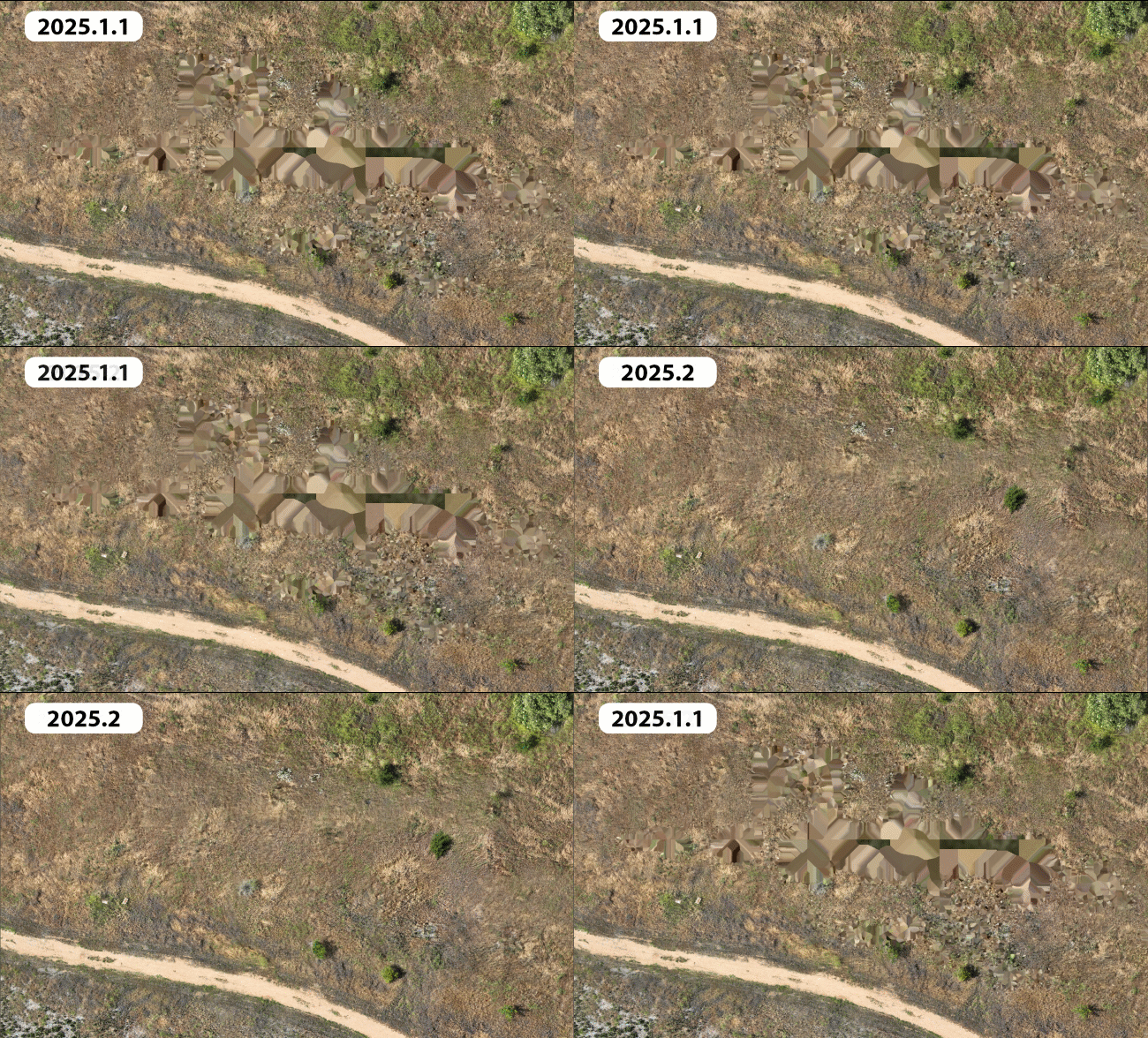
Whether monitoring environmental change or planning community development, the latest enhancements to True Ortho generation in ArcGIS Drone2Map generate more complete results over challenging areas such as tree canopy or featureless portions of a site. This ensures that critical areas are visually complete and greatly reduces the occurrence of gaps or artifacts which means fewer blind spots, uninterrupted workflows, and more reliable analysis across users’ projects.无论是监测环境变化还是规划社区发展,ArcGIS Drone2Map中对正射影像生成功能的最新增强,都能在树冠或场地中缺乏特征的区域等具有挑战性的区域生成更完整的结果。这确保了关键区域在视觉上的完整性,并大大减少了空白或伪影的出现,这意味着用户项目中的盲点更少、工作流程不受中断,分析也更可靠。
Efficient tile-based output with virtual raster tile (VRT) support具有虚拟栅格瓦片(VRT)支持的高效瓦片式输出
To enhance usability and performance in large projects, ArcGIS Drone2Map now offers the ability to create virtual raster tile (.vrt) files along with the individual tiles generated during processing. A VRT is a text file that references individual raster tiles, organizing them into a seamless virtual mosaic without the need to generate a single large output raster.为了提升大型项目中的可用性和性能,ArcGIS Drone2Map 现在能够在处理过程中生成单个瓦片的同时,创建虚拟栅格瓦片(.vrt)文件。VRT 是一种文本文件,它引用各个栅格瓦片,将它们组织成一个无缝的虚拟镶嵌图,而无需生成单个大型输出栅格。
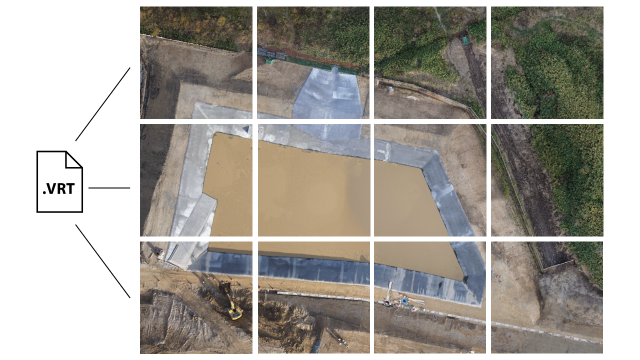
Because the VRT format is supported by ArcGIS and many third-party platforms, it enables broader compatibility and faster workflows. This means users can skip creating large TIFF files and instead use VRTs to efficiently visualize and share mosaics.由于VRT格式得到了ArcGIS和许多第三方平台的支持,因此它具有更广泛的兼容性和更快捷的工作流程。这意味着用户无需创建大型TIFF文件,而是可以使用VRT来高效地可视化和共享镶嵌图。
One-click publishing for complete 3D scenes一键发布完整的3D场景
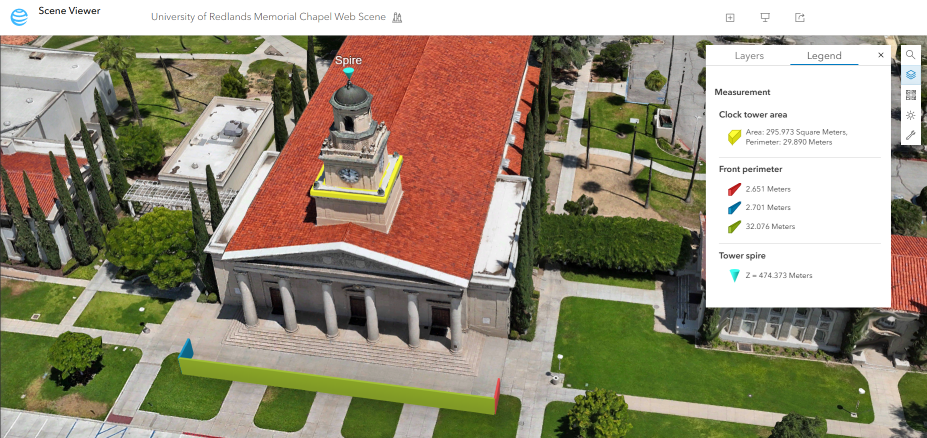
Drone2Map now enables the publishing of complete 3D web scenes, including point clouds and meshes, directly to ArcGIS Online and ArcGIS Enterprise in a single step. This eliminates the need to manually compile layers after upload and mirrors the simplicity of 2D web map sharing. The streamlined publishing process saves time and effort, making it easier to share rich content.Drone2Map现在支持一步直接向ArcGIS Online和ArcGIS Enterprise发布完整的3D网络场景,包括点云与网格。这省去了上传后手动编译图层的步骤,并且与2D网络地图共享的简便性保持一致。这种简化的发布流程节省了时间和精力,让分享丰富内容变得更加轻松。
Automatically apply real-time kinematic (RTK) settings and flag inaccurate drone metadata自动应用实时动态(RTK)设置并标记不准确的无人机元数据
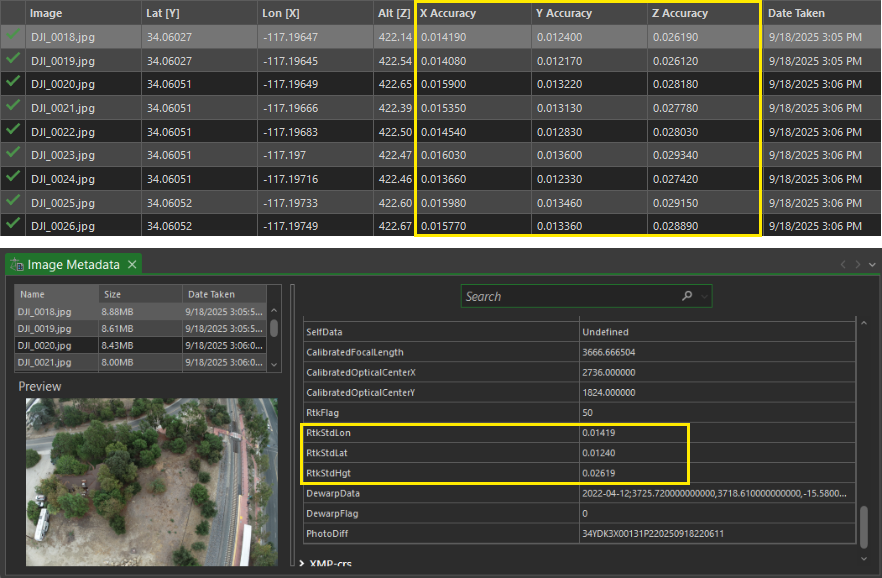
Drone2Map now automatically detects and uses high-accuracy GPS accuracy metadata embedded in drone imagery. By reading horizontal and vertical accuracy values directly from image metadata (EXIF/XMP), Drone2Map automatically sets optimal accuracy parameters, eliminating the need for manual adjustments.Drone2Map现在会自动检测并使用无人机图像中嵌入的高精度GPS精度元数据。通过直接从图像元数据(EXIF/XMP)中读取水平和垂直精度值,Drone2Map会自动设置最佳精度参数,无需手动调整。
Drone2Map supports the following accuracy metadata tags:Drone2Map支持以下精度元数据标签:
• rtk_std_lon
• rtk_std_lat rtk_std_lat
• rtk_std_hgt rtk_std_hgt
• GPSXYAccuracy • GPSXY精度
• GPSZAccuracy GPSZ精度
This new feature also helps identify images with missing or low-quality accuracy data, ensuring consistency and reliability across datasets. If inaccurate values are found, they can be updated with corrected accuracy values using the Set GPS Source window import tab either by manually entering a value or importing a new table.这一新功能还有助于识别缺少准确性数据或准确性数据质量较低的图像,确保数据集的一致性和可靠性。如果发现不准确的值,可以通过“设置GPS源”窗口的导入选项卡,手动输入值或导入新表格来更新为正确的准确性值。
3D correction features for mesh editing用于网格编辑的3D校正功能
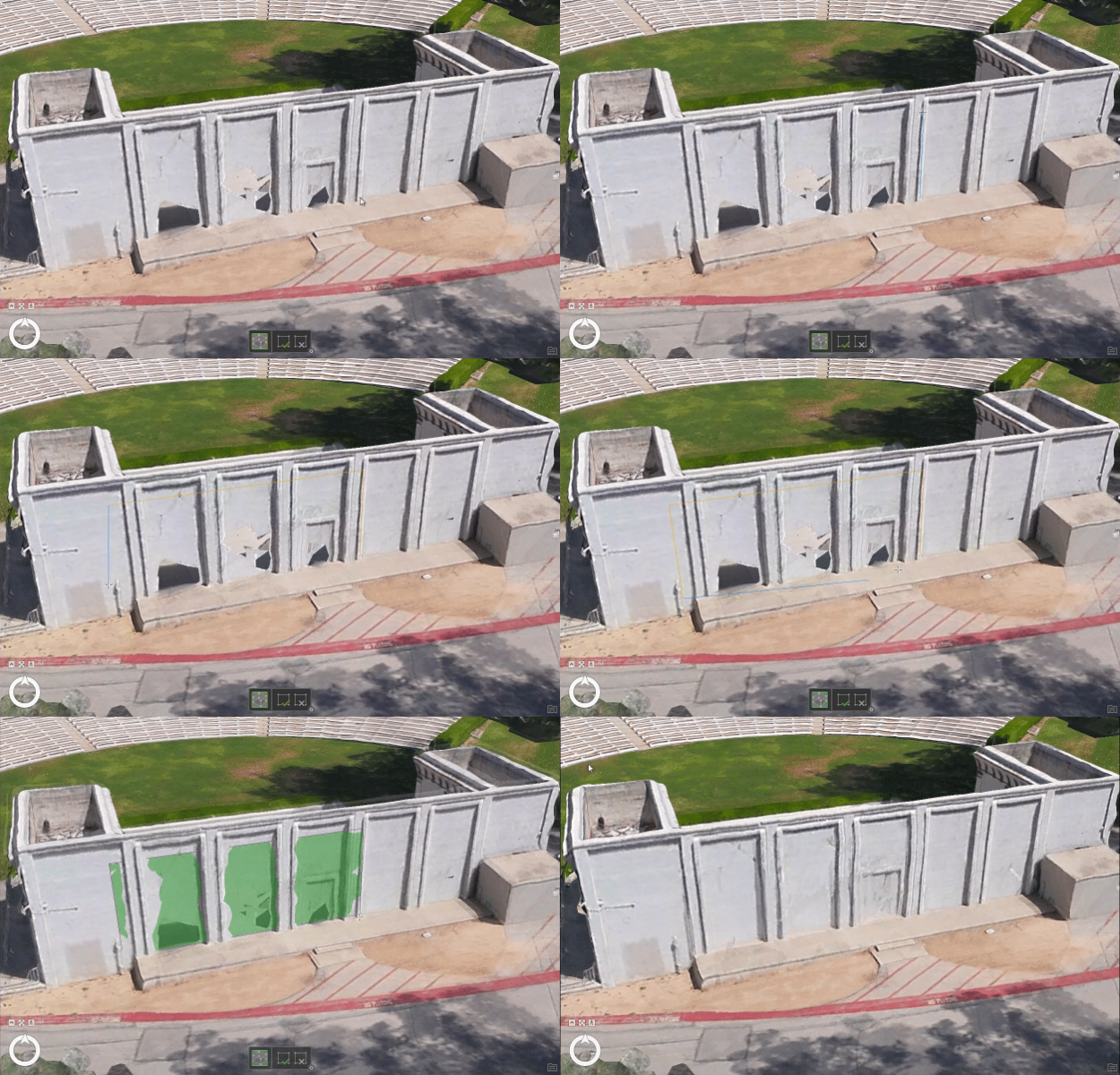
Mesh editing capabilities have been expanded, allowing users to correct vertical mesh faces and resolve anomalies directly within the application. Correction feature tools now include a new in-app editing capability for 3D geometry, providing the ability to enhance 3D Mesh product quality directly within Drone2Map. These tools make it easy to fix common issues in meshes—such as gaps on reflective surfaces or incomplete building facades caused by limited image overlap or viewing angles. With 3D correction features, users can produce cleaner, more complete 3D renderings ready to share with stakeholders or the public.网格编辑功能得到了扩展,用户可以直接在应用程序内修正垂直网格面并解决异常问题。修正功能工具现在包含了新的3D几何体内置编辑能力,能够直接在Drone2Map中提升3D网格产品质量。这些工具便于修复网格中的常见问题,例如由于图像重叠有限或视角问题导致的反光表面缺口或建筑物立面不完整等。借助3D修正功能,用户能够生成更清晰、更完整的3D渲染图,随时可以与利益相关者或公众分享。
Save time with selective tile reprocessing for geospatial refinement通过选择性瓦片再处理节省地理空间优化时间

Drone2Map now supports intelligent tile-based reprocessing, enabling updates to specific areas of products—such as true orthos, digital surface models (DSMs), and point clouds—without reprocessing the entire project. When waterbody masks or correction features are applied, Drone2Map automatically identifies only the affected tiles and reprocesses them. This approach saves significant time and disk space, making it especially valuable for large projects and workflows that require rapid iteration and precise corrections.Drone2Map 现在支持基于瓦片的智能重处理功能,能够更新产品的特定区域(如真正射影像、数字地表模型(DSM)和点云),而无需重新处理整个项目。当应用水体掩码或校正要素时,Drone2Map 会自动仅识别受影响的瓦片并对其进行重处理。这种方法可节省大量时间和磁盘空间,对于需要快速迭代和精确校正的大型项目及工作流而言尤其有价值。
Check out our help documentation for a full list of enhancements. Stay connected with our Esri Community group and join the conversation on enhancements coming in the future.查看我们的帮助文档,获取完整的增强功能列表。请与我们的Esri社区小组保持联系,并参与关于未来增强功能的讨论。




没有回复内容