

ArcGIS GeoBIM delivers a connected data environment that seamlessly links architecture, engineering, and construction (AEC) information in Autodesk Construction Cloud with geospatial data and services in ArcGIS. By bringing these platforms together, teams can smoothly collaborate from initial design through operations—empowering better decisions and project outcomes.ArcGIS GeoBIM 提供了一个互联数据环境,能将Autodesk Construction Cloud中的建筑、工程和施工(AEC)信息与ArcGIS中的地理空间数据及服务无缝连接起来。通过整合这些平台,团队可以从初步设计到运营阶段顺利协作,助力做出更优决策并取得更好的项目成果。
Esri’s ArcGIS is an enterprise geospatial platform that provides a comprehensive set of capabilities for creating, managing, analyzing, and mapping geographic information. Together with Autodesk, Esri is committed to continually evolving connected GIS and BIM workflows between ArcGIS and Autodesk Construction Cloud.Esri的ArcGIS是一个企业级地理空间平台,它提供了一套全面的功能,用于创建、管理、分析和绘制地理信息。Esri与Autodesk携手,致力于不断改进ArcGIS与Autodesk Construction Cloud之间的互联GIS和BIM工作流。
This release on ArcGIS Enterprise 12.0 streamlines GIS and BIM integration with simplified 3D models, expands flexibility for building custom web apps, and adds support for more file formats.此次发布的ArcGIS Enterprise 12.0版本通过简化的3D模型优化了GIS与BIM的集成,增强了构建自定义网络应用程序的灵活性,并增加了对更多文件格式的支持。
Release highlights 版本亮点
Dive deeper into the latest capabilities now available in ArcGIS GeoBIM by visiting the product documentation and try them out for yourself. Have questions, feedback, or product ideas to share with our team? Visit and make a post in Esri Community today.深入了解 ArcGIS GeoBIM 现有的最新功能,请访问 产品文档</b0 并亲自试用。有问题、反馈或产品想法想与我们的团队分享吗?请立即访问并在 Esri 社区中发帖。
Simplified 3D models streamline GIS and BIM integration (beta)简化的3D模型简化了GIS与BIM的集成(测试版)
AEC teams can now bring large infrastructure and building models into ArcGIS more efficiently during planning and design. The new Add Document Models tool creates lightweight 3D models, reducing file sizes by up to 95 percent, from Revit and IFC documents with direct links to source files in Autodesk Construction Cloud.AEC团队现在可以在规划和设计期间更高效地将大型基础设施和建筑模型导入ArcGIS。新的添加文档模型工具能创建轻量级3D模型,将Revit和IFC文档的文件大小缩减高达95%,并与Autodesk Construction Cloud中的源文件直接关联。
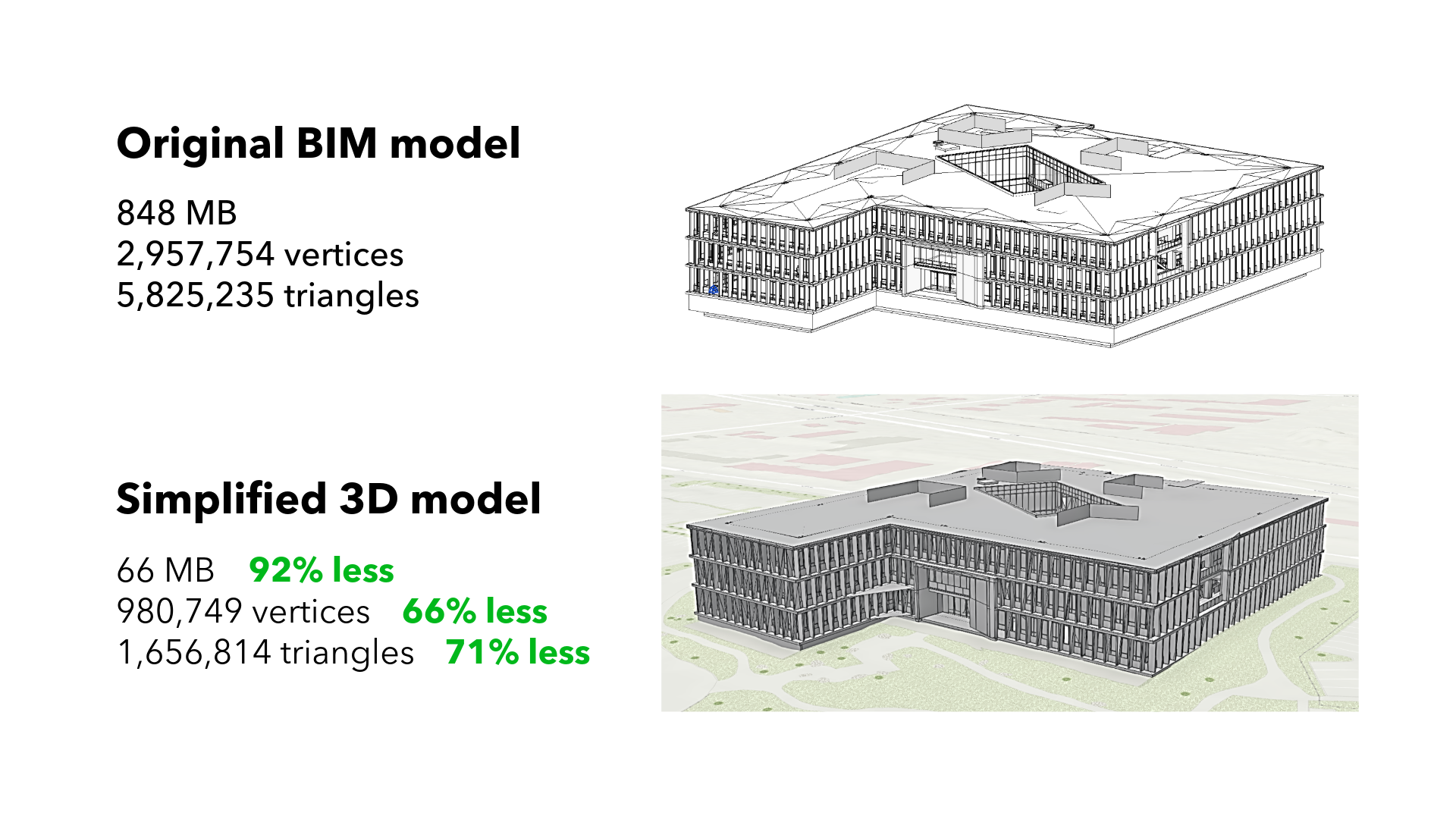
The tool automatically places models in the correct location and generates ready-to-use 3D web scenes. This eliminates the need for ArcGIS Pro when working with simple models, saving time and cost, minimizing platform switching, and making it easier to share responsive, geolocated BIM content with stakeholders. Teams gain faster access to critical design data, stronger client communication, and more confident decision-making.该工具会自动将模型放置在正确位置,并生成可直接使用的3D网页场景。这消除了处理简单模型时对ArcGIS Pro的需求,节省了时间和成本,减少了平台切换,也让与利益相关者共享响应式、带地理定位的BIM内容变得更加容易。团队能够更快地获取关键设计数据,加强与客户的沟通,并更有信心地做出决策。
Read this article to learn more about the benefits of using simplified 3D models and building layers across ArcGIS.阅读这篇文章,了解在ArcGIS中使用简化3D模型和构建图层的更多好处。
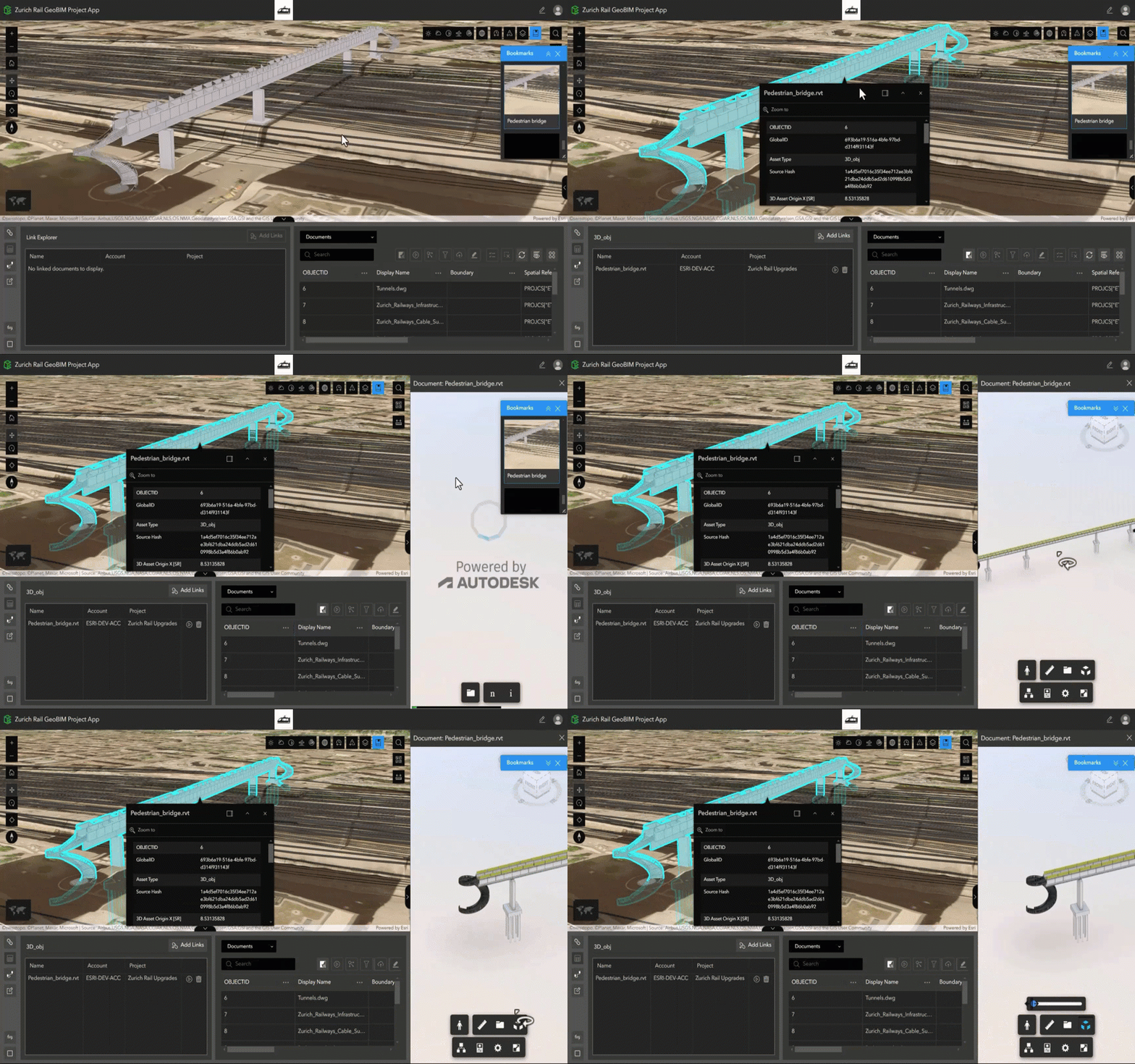
Build custom apps with new widgets in ArcGIS Experience Builder使用ArcGIS Experience Builder中的新组件构建自定义应用程序
Three new widgets in ArcGIS Experience Builder make it easier to create customized web apps that connect GIS and AEC data. Designed to enhance enterprise integration between Autodesk Construction Cloud and ArcGIS, these new widgets extend the ArcGIS GeoBIM experience enabling better collaboration and project insight:ArcGIS 体验构建器中的三个新微件使创建连接GIS和AEC数据的定制化Web应用程序变得更加容易。这些新微件旨在增强Autodesk Construction Cloud与ArcGIS之间的企业级集成,扩展了ArcGIS GeoBIM体验,从而实现更好的协作和项目洞察:
- Model Viewer: Interact with linked 3D models and 2D documents. 模型查看器:与关联的3D模型和2D文档进行交互。
- Link Explorer: Explore all project documents linked to features in web maps or scenes. 链接浏览器:浏览所有与网络地图或场景中的要素相关联的项目文档。
- Document Explorer: Easily browse a folder tree of all project documents and data. 文档浏览器:轻松浏览所有项目文档和数据的文件夹树。
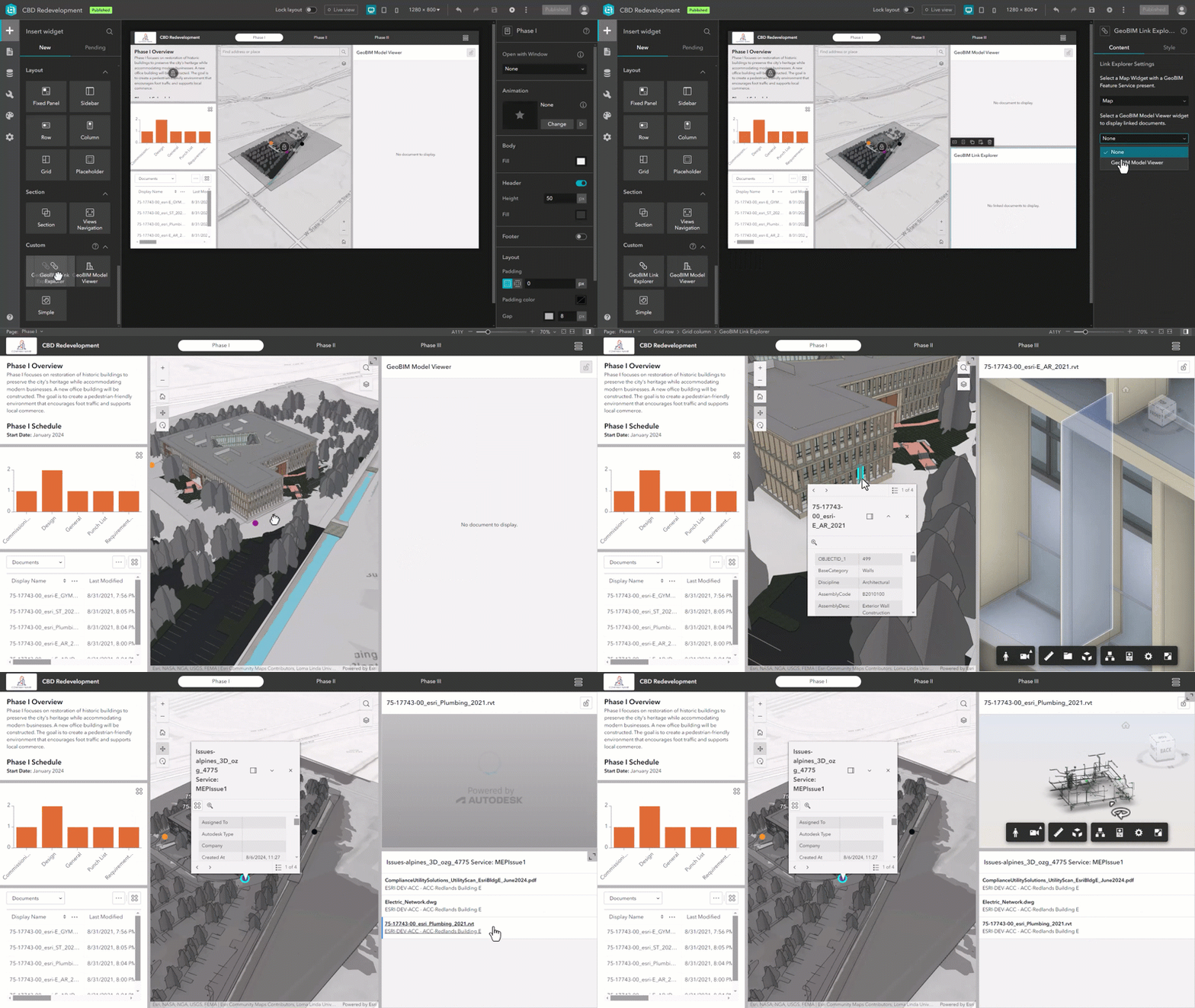
With more ways to connect GIS and AEC data in customized ArcGIS Experience Builder web apps, teams can share information more effectively, collaborate with stakeholders, and gain deeper insight into project performance. 通过在定制的ArcGIS Experience Builder网络应用程序中增加GIS和AEC数据的连接方式,团队能够更有效地共享信息、与利益相关者协作,并更深入地了解项目绩效。
Whether you’re a user of ArcGIS GeoBIM looking to customize project apps—or a user of ArcGIS Experience Builder looking to work with building information modeling (BIM) data—these new widgets offer expanded possibilities for building web apps your way.无论您是希望自定义项目应用程序的ArcGIS GeoBIM用户,还是希望处理建筑信息模型(BIM)数据的ArcGIS Experience Builder用户,这些新的小组件都为您按照自己的方式构建网络应用程序提供了更多可能性。
Read this article to learn more about the widgets, what you can build, and how to get started.阅读这篇文章,了解更多关于小组件的信息、您可以构建的内容以及如何开始。
![图片[4]-ArcGIS Enterprise 12.0 上 ArcGIS GeoBIM 的新功能-ArcGIS论坛-软件-CityEngine城市引擎](https://www.esri.com/arcgis-blog/wp-content/uploads/2025/11/arcgis-geobim-enterprise-12-0-release-experience-builder-custom-app.png)
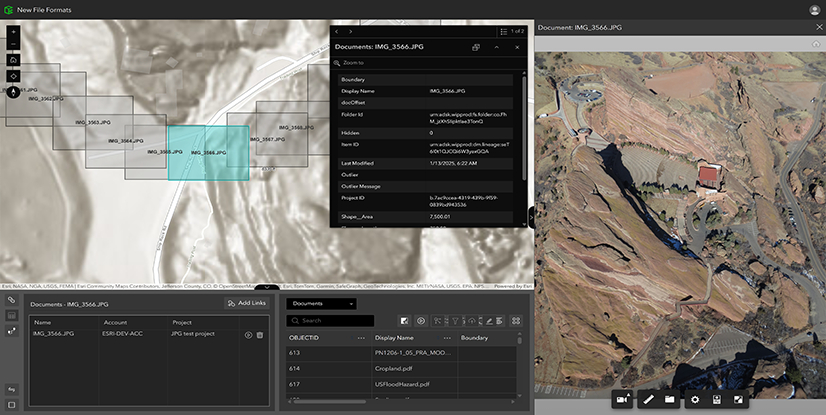
Expanded file support for JPG, PDF, and DGN files扩展了对JPG、PDF和DGN文件的支持
By integrating commonly used formats, including PDFs and DGNs often used in transportation workflows, ArcGIS GeoBIM transforms static files into strategic, collaborative assets. With a unified platform for accessing CAD drawings, field images, and engineering documents, project teams can reduce delays, improve coordination, and focus more time on execution instead of file management. 通过整合常用格式(包括交通工作流程中经常使用的PDF和DGN),ArcGIS GeoBIM将静态文件转化为具有战略意义的协作资产。借助一个可访问CAD图纸、现场图像和工程文档的统一平台,项目团队能够减少延误、加强协作,并将更多时间用于执行工作而非文件管理。
Other enhancements 其他增强功能
Extended support for new Autodesk Construction Cloud regions对新的Autodesk Construction Cloud区域的扩展支持
New Autodesk Construction Cloud regions are now available to customers using ArcGIS GeoBIM in ArcGIS Enterprise 12.0. On July 1, 2025, Autodesk announced the availability of five new regions—UK, Germany, Japan, Canada, and India—for hosting project data in Autodesk Construction Cloud products, expanding beyond US, EU, and APAC.现在,使用ArcGIS Enterprise 12.0中的ArcGIS GeoBIM的客户可以使用新的欧特克建筑云区域。2025年7月1日,欧特克宣布新增五个区域——英国、德国、日本、加拿大和印度,用于在欧特克建筑云产品中托管项目数据,这是在美國、歐盟和亚太地区之外的扩展。
Learn more in the release notes 在发布说明中了解更多信息
Resources 资源
Get started with ArcGIS GeoBIM tutorial series开始学习ArcGIS GeoBIM教程系列
If you’re new to using ArcGIS GeoBIM, start learning the basics of preparing your data to create and share your first GeoBIM project and app. Then, advance your skills to collect, monitor, and address project issues with office to field collaboration. With four tutorials series that build on each other, you’ll also find learning content for extending ArcGIS GeoBIM as a system to build custom apps, tailor 3D scenes, and work with schedules.如果你是ArcGIS GeoBIM的新用户,可以先学习准备数据的基础知识,以创建和分享你的第一个GeoBIM项目及应用程序。然后,提升你的技能,通过办公室与现场的协作来收集、监控和解决项目问题。这里有四个相互衔接的教程系列,你还能找到有关将ArcGIS GeoBIM扩展为系统的学习内容,包括构建自定义应用程序、定制3D场景以及处理进度计划等。
Start learning ArcGIS GeoBIM 开始学习ArcGIS GeoBIM
Tutorial: Prepare your data for ArcGIS GeoBIM教程:为ArcGIS GeoBIM准备数据
Georeferencing your design files is a critical first step for integrating BIM and GIS. Doing so ensures that when these files are uploaded to Autodesk Construction Cloud and linked in ArcGIS GeoBIM, they align to the correct location on earth. This helpful guide provides a comprehensive, step-by-step approach to georeference CAD and BIM files entirely within Autodesk AutoCAD, Civil 3D, and Revit. It also covers setup, assigning a coordinate system, and three Revit workflows for establishing shared coordinates.为设计文件进行地理配准是整合建筑信息模型(BIM)和地理信息系统(GIS)的关键第一步。这样做可以确保这些文件上传至欧特克建筑云(Autodesk Construction Cloud)并在ArcGIS GeoBIM中链接时,能够与地球上的正确位置对齐。本实用指南提供了一种全面的、分步的方法,可完全在欧特克AutoCAD、Civil 3D和Revit中对CAD和BIM文件进行地理配准。它还涵盖了设置、坐标系分配以及三种用于建立共享坐标的Revit工作流程。
Learn how to georeference your data了解如何对您的数据进行地理配准
Q&A: When digital twins meet real-world infrastructure challenges问答:当数字孪生遇上现实世界的基础设施挑战
GIS and BIM integration (or GeoBIM) is helping to bring clarity to complex infrastructure projects—from airports and data centers to nuclear plants. In this interview with George Floros of AtkinsRéalis, you’ll learn how GeoBIM moves beyond creating impressive visualizations to delivering tangible improvements in project coordination, safety, and operational efficiency.地理信息系统(GIS)与建筑信息模型(BIM)的集成(或称GeoBIM)正有助于为复杂的基础设施项目带来清晰度——从机场、数据中心到核电站皆是如此。在这次对AtkinsRéalis公司的乔治·弗洛罗斯的采访中,你将了解到GeoBIM如何超越创建令人印象深刻的可视化效果,在项目协调、安全性和运营效率方面带来切实的改进。
Read the interview to learn more 阅读访谈了解更多信息
Take the next step 迈出下一步
If you’re using ArcGIS Enterprise 11.4 or higher, you can access ArcGIS GeoBIM as an included app with a Contributor user type or above. To begin creating ArcGIS GeoBIM projects and apps, you’ll need at least one Creator, Professional, or Professional Plus user type along with Autodesk licensing.如果您使用的是ArcGIS Enterprise 11.4或更高版本,您可以将ArcGIS GeoBIM作为一款内置应用程序进行访问,前提是您拥有贡献者及以上级别的用户类型。要开始创建ArcGIS GeoBIM项目和应用程序,您至少需要一个创建者、专业版或专业增强版用户类型,以及Autodesk许可。
There are many reasons to upgrade to the next generation of ArcGIS Enterprise. Discover what’s new in ArcGIS Enterprise 12.0 for an overview of the exciting enhancements and powerful geospatial capabilities included to support your work.升级到下一代ArcGIS Enterprise有很多理由。了解ArcGIS Enterprise 12.0的新功能,即可概览其中令人振奋的增强功能和强大的地理空间能力,这些功能将为您的工作提供支持。




没有回复内容