

We’re excited to share the powerful new and enhanced GeoAI capabilities available in the ArcGIS Pro 3.6 Image Analyst Extension. You’ll find that the entire training data pipeline has been refined, introducing powerful training data review tools that provide the confidence and efficiency needed to build the best deep learning models. This release is all about making your workflows easier and your results more accurate than ever.我们很高兴分享ArcGIS Pro 3.6影像分析师扩展模块中新增和增强的强大GeoAI功能。您会发现整个训练数据流程已得到优化,并引入了强大的训练数据审查工具,这些工具为构建最佳深度学习模型提供了所需的信心和效率。此版本旨在让您的工作流程更加简便,结果比以往任何时候都更加准确。
Here’s a quick look at the powerful new capabilities across GeoAI workflows:以下是 GeoAI 工作流中强大的新功能快速概览:
- New training data review tools 新的训练数据审核工具
- New Transform Image Shapes tool 新的变换图像形状工具
- Enhanced Grad-CAM for multi-classification用于多分类的增强版Grad-CAM
- Enhanced Auto Detect with multi-click带多点击功能的增强型自动检测
- New backend Deep Learning readiness check新的后端深度学习就绪性检查
- New 3D-RCNet model type 新的3D-RCNet模型类型
New training data review tools 新的训练数据审查工具
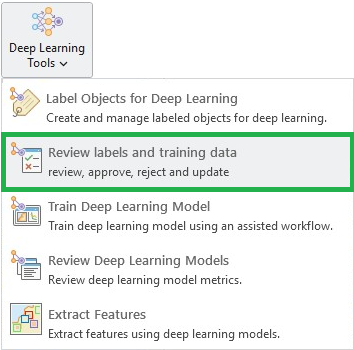
Reliable GeoAI starts with reliable training data. To ensure the highest model accuracy, we’ve provided powerful tools to review your labels and training data. ArcGIS Pro 3.6 introduces a comprehensive set of quality assurance (QA) and quality control (QC) tools for your labels and exported training data.可靠的地理人工智能始于可靠的训练数据。为确保最高的模型准确性,我们提供了强大的工具来检查您的标签和训练数据。ArcGIS Pro 3.6 引入了一套全面的质量保证(QA)和质量控制(QC)工具,用于处理您的标签和导出的训练数据。
Manual review of labels 标签的人工审核
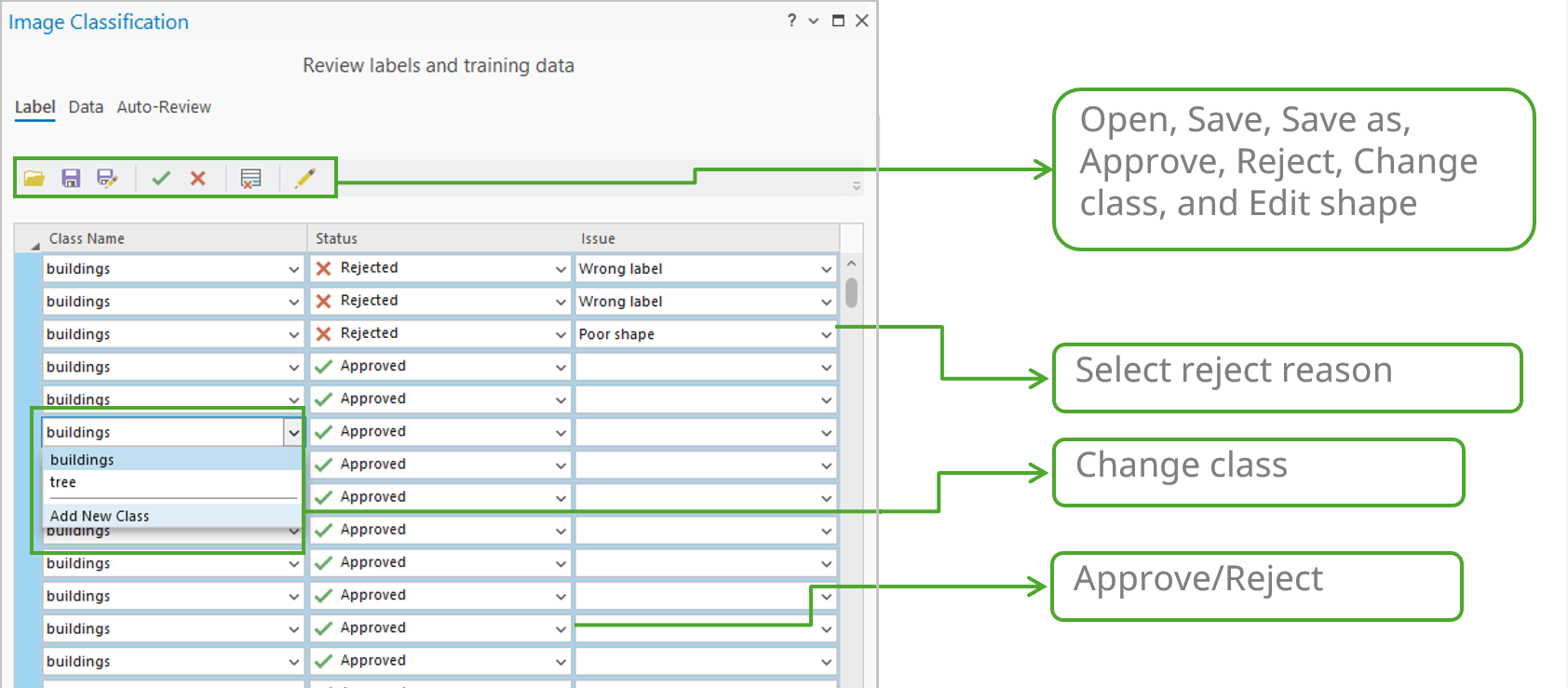
Since label creation is a critical but labor-intensive process, ensuring quality is essential for model performance. Labels often contain errors in class name or geometry. To streamline this manual QA process, we’ve dedicated a Label tab to centralize all the necessary tools. This tab allows you to quickly select single or multiple labels and take actions—such as review, approve, reject, and edit—directly and efficiently.由于标签创建是一个关键但耗时费力的过程,确保标签质量对模型性能至关重要。标签的类别名称或几何形状往往存在错误。为了简化这种手动质量检查流程,我们专门设置了一个标签选项卡,集中所有必要的工具。通过这个选项卡,您可以快速选择单个或多个标签,并直接高效地执行检查、批准、拒绝和编辑等操作。
Automated review of labels 标签的自动审核
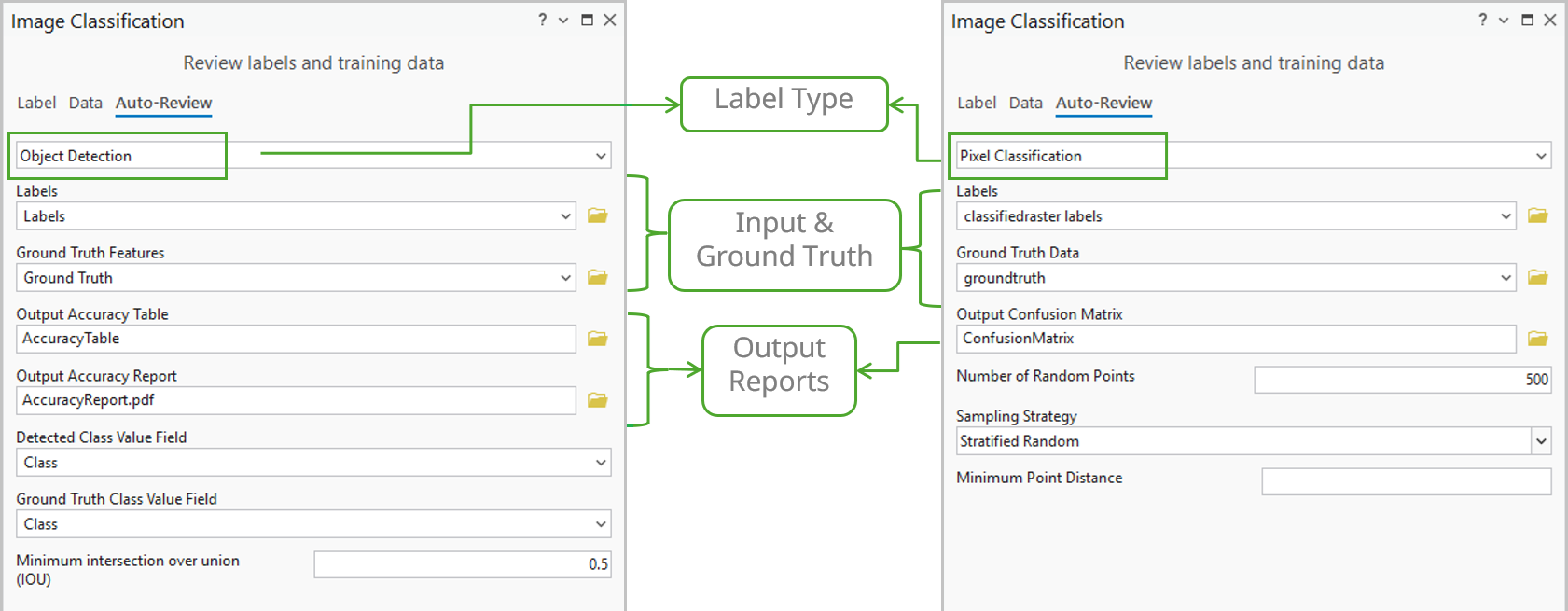
However, manual review may not be feasible for large datasets. To speed up the process, the new tools on the Auto-Review tab quickly assess label quality by comparing them against small ground truth samples.然而,对于大型数据集而言,人工审核可能并不可行。为了加快这一过程,自动审核选项卡上的新工具通过将标签与小型真实样本进行比较,来快速评估标签质量。
- Object Detection —Provides essential accuracy metrics such as Common Objects in Context (COCO), mean Average Precision (mAP), and a Precision x Recall curve. The tool uses the Intersection over Union (IoU) ratio to identify and count true/false positives/negatives and generates a detailed quality report.目标检测——提供关键的精度指标,如上下文中的常见物体(COCO)、平均精度均值(mAP)以及精度-召回率曲线。该工具使用交并比(IoU)来识别和统计真阳性、假阳性、真阴性和假阴性,并生成详细的质量报告。
- Pixel Classification—Computes a confusion matrix based on errors of omission (false negatives, where a pixel that should have been classified as a class is missed) and errors of commission (false positives, where a pixel is incorrectly classified as belonging to a class when it does not), along with the IoU score. This process directly compares the results of your trained model against the ground truth reference data.像素分类——基于遗漏误差(假阴性,即本应被分类为某一类别的像素被遗漏)和误分误差(假阳性,即像素被错误地分类为某一类别但实际上并不属于该类别)以及交并比(IoU)分数计算混淆矩阵。此过程将训练好的模型结果与地面真实参考数据直接进行比较。
Training data review 训练数据审核
The Data tab offers a quick visual QA review of your exported image chips. The main gallery shows image chips with class names with bounding boxes. Selecting a thumbnail displays it at full size for detailed inspection. This allows reviewers to quickly check for common issues such as incorrect chip size, missing or partial labels, or a lack of overlap. To help you review the image chips and labels more efficiently, the Data tab includes filtering, playback, and navigation controls that allow you to quickly screen the exported data. (Note: This visual tool currently only supports object detection training data.)“数据”选项卡提供对导出图像切片的快速可视化质量检查。主图库显示带有类别名称和边界框的图像切片。选择缩略图会以全尺寸显示该图像,以便进行详细检查。这使审核人员能够快速检查常见问题,例如切片尺寸不正确、标签缺失或不完整,或缺乏重叠。为了帮助您更高效地审核图像切片和标签,“数据”选项卡包含筛选、播放和导航控制功能,可让您快速筛选导出的数据。(注意:此可视化工具目前仅支持目标检测训练数据。)

New Transform Image Shapes tool 新的变换图像形状工具
Now in ArcGIS Pro, we’re giving you direct control over the geometry of your deep learning output. The Transform Image Shapes tool converts feature geometries between Image Space (the sensor perspective) and Map Space (the standard ground coordinate system). This is important for workflows involving oblique imagery or complex distortions. This tool ensures features detected in the raw image space are correctly placed and measured on the map after rectification. Ultimately, this guarantees the highest geometric accuracy for your final analysis.现在在ArcGIS Pro中,我们让您可以直接控制深度学习输出的几何形状。图像形状转换工具能在图像空间(传感器视角)和地图空间(标准地面坐标系)之间转换要素几何形状。这对于涉及倾斜影像或复杂畸变的工作流而言非常重要。该工具可确保在原始图像空间中检测到的要素在纠正后能正确地放置在地图上并进行测量。最终,这将为您的最终分析保证最高的几何精度。
Enhanced Grad-CAM 增强型Grad-CAM
The Grad-CAM feature for Object Classification was introduced at the version 3.5 release, to highlight influential pixels for a single class. This functionality has been extended to now support multi-label classification.用于目标分类的Grad-CAM功能在3.5版本发布时推出,用于突出显示单个类别的影响像素。此功能现已扩展,支持多标签分类。
Now, when classifying features into multiple categories, the tool generates multiple attachments in the output feature class—one attachment for each predicted label. This capability gives you detailed insight by showing the specific pixel regions that influenced the model’s decision for every individual class, dramatically increasing the interpretability of complex multi-label classification results.现在,在将特征分类到多个类别中时,该工具会在输出特征类中生成多个附件——每个预测标签对应一个附件。此功能通过展示影响模型对每个单独类别做出决策的特定像素区域,为您提供详细见解,显著提高了复杂多标签分类结果的可解释性。
Enhanced Auto Detect with multi-click带多点击功能的增强型自动检测
We enhanced the existing Auto Detect specifically for complex features. It now supports multi-click workflows for labeling structures, such as complex buildings or trees. You no longer rely on a single click. Instead, you provide the tool with multiple reference points, which allows it to integrate your input and generate a more accurate object boundary for complex shapes and objects.我们专门针对复杂特征增强了现有的自动检测功能。它现在支持用于标记结构(如复杂建筑物或树木)的多点击工作流。您不再依赖单次点击。相反,您可以为该工具提供多个参考点,这使其能够整合您的输入,为复杂形状和对象生成更准确的对象边界。

New backend Deep Learning readiness check新的后端深度学习就绪性检查
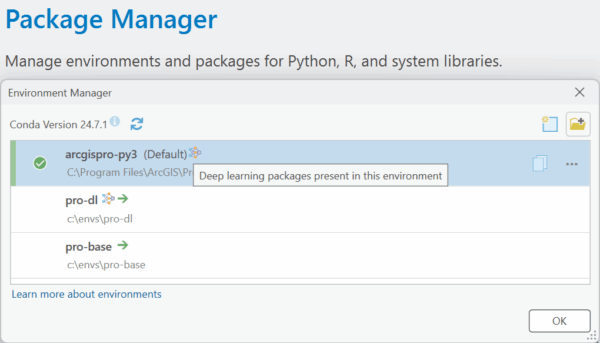
Ensuring your Deep Learning environment is set up correctly is also crucial. We’ve included a simpler way to verify your setup: a new function that allows the backend to report whether your ArcGIS Pro Python environment is ready for deep learning workflows. This is a fast, definitive check that confirms that the necessary libraries are correctly configured and accessible to ArcGIS Pro.确保您的深度学习环境设置正确也至关重要。我们提供了一种更简单的方法来验证您的设置:一个新函数,允许后端报告您的ArcGIS Pro Python环境是否已准备好用于深度学习工作流。这是一项快速、明确的检查,可确认必要的库已正确配置并能被ArcGIS Pro访问。
New 3D-RCNet model type support 新增3D-RCNet模型类型支持
Hyperspectral Imaging (HSI) data enables the precise identification of materials based on their unique spectral signatures. Therefore, we are introducing the Hyperspectral3DRCNet (3D-RCNet) model in ArcGIS. This specialized deep learning model type delivers high-accuracy classification of complex HSI data, which is essential for advanced remote sensing applications. It uses an architecture that efficiently merges the strengths of 3D Convolutional Neural Networks (ConvNets) and Vision Transformers. It embeds the Transformer’s powerful self-attention mechanism into a novel 3D relational convolutional operation, ensuring superior performance and computational efficiency.高光谱成像(HSI)数据能够基于材料独特的光谱特征对其进行精确识别。因此,我们在ArcGIS中引入了Hyperspectral3DRCNet(3D-RCNet)模型。这种专门的深度学习模型类型可对复杂的HSI数据进行高精度分类,这对于先进的遥感应用至关重要。它采用的架构能有效融合三维卷积神经网络(ConvNets)和视觉Transformer的优势。该模型将Transformer强大的自注意力机制嵌入到一种新颖的三维关系卷积操作中,从而确保了卓越的性能和计算效率。
Wrap-up 总结
ArcGIS Pro 3.6 focuses on improving your GeoAI workflow quality—from training data validation, to model interpretability, and advanced classification. We can’t wait to see the powerful GeoAI applications you build with these expanded capabilities.ArcGIS Pro 3.6 专注于提升您的地理人工智能工作流质量——从训练数据验证,到模型可解释性,再到高级分类。我们迫不及待地想看到您借助这些扩展功能构建出强大的地理人工智能应用。







没有回复内容