

ArcGIS is a comprehensive geospatial platform that offers a wide range of solutions for integrating and managing data.ArcGIS是一个全面的地理空间平台,它提供了广泛的解决方案,用于整合和管理数据。
ArcGIS Online and ArcGIS Enterprise are two Web GIS systems that are foundational to managing GIS data. They power the apps, maps, and web layers that unite and share data across—and even outside of—an organization. Both offer flexibility and comprehensive solutions for integrating data into an organization’s most critical mapping and analysis workflows.ArcGIS Online 和 ArcGIS Enterprise 是两个Web GIS系统,它们是管理GIS数据的基础。它们为应用程序、地图和网络图层提供支持,这些应用程序、地图和网络图层能在组织内部乃至外部整合和共享数据。两者都提供了灵活性和全面的解决方案,可将数据整合到组织最关键的地图绘制和分析工作流中。
So which data management strategy is best? That depends on factors such as how often the data is updated, where it originates, and the steps involved with getting data into a presentable state. Let’s explore six common methods for integrating data in ArcGIS and highlight some key benefits of each.那么,哪种数据管理策略是最佳的呢?这取决于多种因素,比如数据的更新频率、数据的来源以及将数据处理成可展示状态所涉及的步骤。让我们探讨在ArcGIS中集成数据的六种常见方法,并强调每种方法的一些主要优势。
Scenario 1: You need an easy and efficient way to integrate data and use it in your ArcGIS organization.场景1:您需要一种简单高效的方法来整合数据并在您的ArcGIS组织中使用这些数据。
Your data is in a ready-to-use state for mapping, analysis, or reporting, and it doesn’t require cleaning or formatting. You want to ingest a static copy of the data because it won’t be updated or edited.你的数据处于可直接用于映射、分析或报告的状态,无需清理或格式化。你希望获取该数据的静态副本,因为它不会被更新或编辑。
Solution: Add your content directly to ArcGIS Online or ArcGIS Enterprise.解决方案:将您的内容直接添加到ArcGIS Online或ArcGIS Enterprise中。
Users can add data from a variety of sources, such as a local drive or network, in many data formats, including CSV, Microsoft Excel, GeoJSON, shapefiles, tile packages, scene layers, imagery, and open source. Once added to ArcGIS Online or ArcGIS Enterprise, this data can be transformed into web layers that are ready for use in web maps, web apps, and analysis tools.用户可以从多种来源添加数据,例如本地驱动器或网络,支持多种数据格式,包括CSV、Microsoft Excel、GeoJSON、shapefile(shape文件)、瓦片包、场景图层、影像和开源格式。这些数据一旦添加到ArcGIS Online或ArcGIS Enterprise中,就可以转换为Web图层,随时用于Web地图、Web应用程序和分析工具。
Some file types can be published as a hosted feature layer during the upload process, making the data immediately usable in web maps and apps. With ArcGIS Online, users can even upload data from common cloud storage solutions such as Microsoft OneDrive, Google Drive, and Dropbox.某些文件类型在上传过程中可以发布为托管要素图层,使数据能够立即在网络地图和应用程序中使用。借助ArcGIS Online,用户甚至可以从常见的云存储解决方案(如Microsoft OneDrive、Google Drive和Dropbox)上传数据。
Scenario 2: Your maps always need to reflect the most current information. As you create, edit, and analyze data, updates must appear instantly.场景2:您的地图始终需要反映最新信息。在您创建、编辑和分析数据时,更新内容必须立即显示。
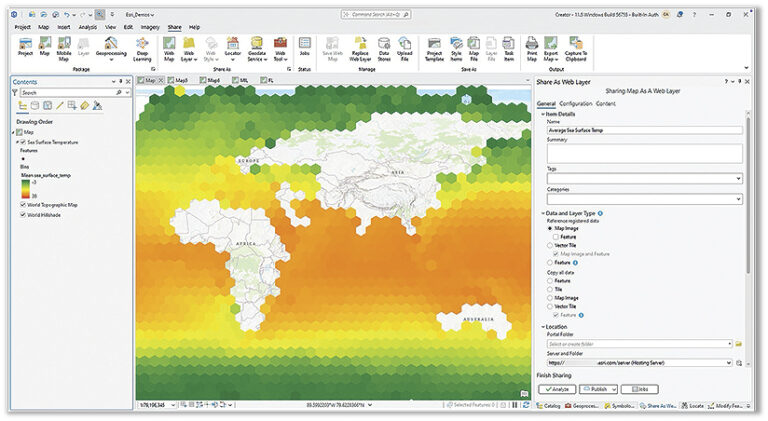
Solution: Use ArcGIS Pro to share web layers with ArcGIS Enterprise.解决方案:使用ArcGIS Pro与ArcGIS Enterprise共享网络图层。
ArcGIS Pro seamlessly integrates with the web-based components of ArcGIS. It can connect to various types of data, including files stored on a computer or network drive, data in enterprise geodatabases or cloud data warehouses, and other locations.ArcGIS Pro 与 ArcGIS 基于网络的组件无缝集成。它可以连接到各种类型的数据,包括存储在计算机或网络驱动器上的文件、企业地理数据库或云数据仓库中的数据以及其他位置的数据。
This option gives users continual access to the original data source, ensuring that maps and apps always contain the most up-to-date information. Additionally, since users connect directly to their data rather than copy it, this option avoids data duplication.此选项为用户提供对原始数据源的持续访问权限,确保地图和应用程序始终包含最新信息。此外,由于用户直接连接到其数据而非复制数据,此选项可避免数据重复。
Once data is shared with ArcGIS Enterprise, it becomes available for editing, querying, visualization, spatial analysis, and collaboration.一旦数据与ArcGIS Enterprise共享,就可以用于编辑、查询、可视化、空间分析和协作。
Scenario 3: You need to integrate messy data from your sources, and it must be up-to-date on your map.场景3:你需要整合来自各来源的杂乱数据,且这些数据在你的地图上必须是最新的。
Your data requires some cleanup before it can be integrated and used in ArcGIS. You need a fast and easy solution to transform and ingest the data so you can immediately leverage it in your map layers and keep them current.在整合并用于ArcGIS之前,您的数据需要进行一些清理。您需要一个快速简便的解决方案来转换和摄取数据,以便能立即在地图图层中利用这些数据并保持其时效性。
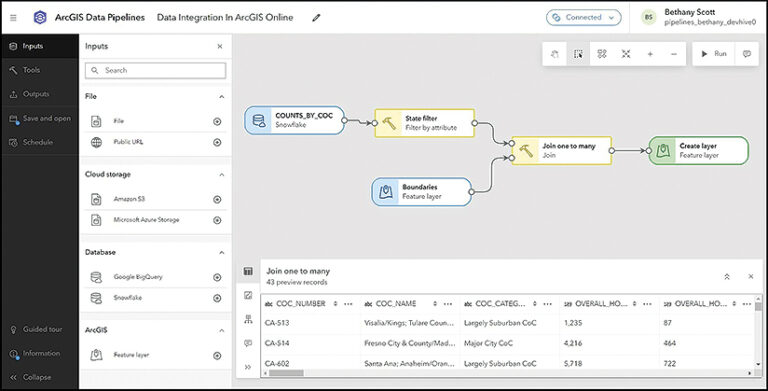
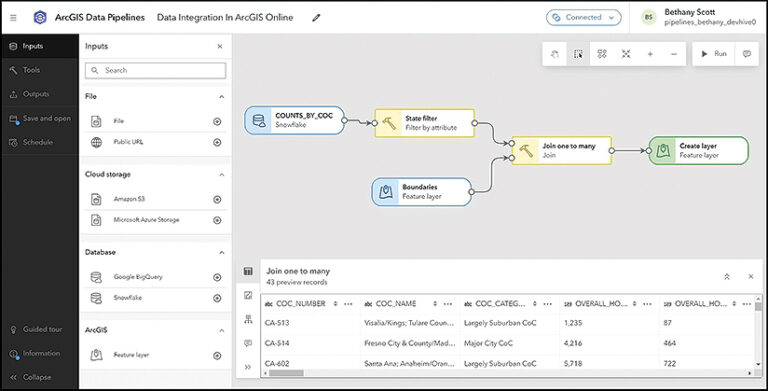
Solution: Try the ArcGIS Data Pipelines app with ArcGIS Online.解决方案:尝试将 ArcGIS Data Pipelines 应用程序与 ArcGIS Online 配合使用。
ArcGIS Data Pipelines is a no-code tool that transforms and integrates data with ArcGIS. It provides a fast, efficient way to establish secure connections to cloud-based data stores, such as Snowflake, Google BigQuery, Amazon S3, and Microsoft’s Azure Blob Storage—as well as URLs and REST APIs.ArcGIS Data Pipelines 是一款无需编码的工具,可与 ArcGIS 进行数据转换和集成。它提供了一种快速、高效的方式来建立与云数据存储的安全连接,例如 Snowflake、Google BigQuery、Amazon S3 和微软的 Azure Blob Storage,以及 URL 和 REST API。
Users can schedule automatic data pipelines to run on a recurring basis to keep layers in ArcGIS Online up-to-date as the source datasets change. For data that requires cleaning, formatting, and transformation prior to use, Data Pipelines can be used to speed up and streamline preparation workflows.用户可以安排自动数据管道定期运行,以便在源数据集发生变化时,保持ArcGIS Online中的图层为最新状态。对于在使用前需要清理、格式化和转换的数据,数据管道可用于加快和简化准备工作流程。
Data Pipelines is included with ArcGIS Online for Creator user type licenses and above.数据管道包含在ArcGIS Online的Creator及以上用户类型许可中。
Scenario 4: Your projects require real-time data processing, and you want to integrate data from Internet of Things (IoT) sensors and other live feeds.场景4:你的项目需要实时数据处理,并且你希望整合来自物联网(IoT)传感器和其他实时数据源的数据。
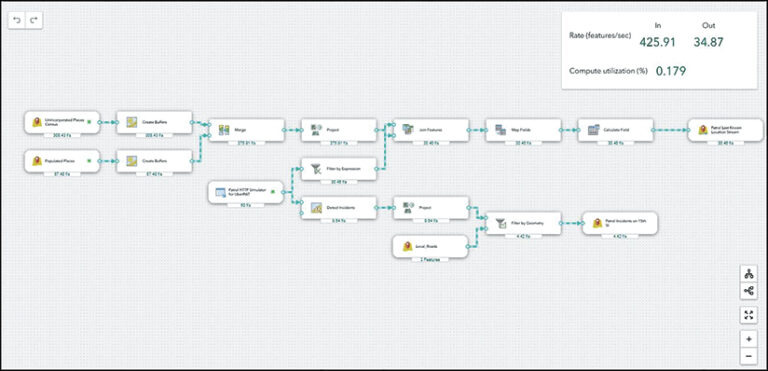
Solution: Use ArcGIS Velocity with ArcGIS Online, or ArcGIS GeoEvent Server with ArcGIS Enterprise.解决方案:将ArcGIS Velocity与ArcGIS Online配合使用,或者将ArcGIS GeoEvent Server与ArcGIS Enterprise配合使用。
ArcGIS Velocity is the real-time and big data processing and analysis capability of ArcGIS Online. It allows users to import real-time spatial data and store, visualize, analyze, and act on it in their GIS. ArcGIS GeoEvent Server is part of ArcGIS Enterprise, and allows users to consume, visualize, and analyze on-premises streaming data in real time.ArcGIS Velocity是ArcGIS Online的实时和大数据处理与分析功能。它允许用户导入实时空间数据,并在其GIS中对这些数据进行存储、可视化、分析和操作。ArcGIS GeoEvent Server是ArcGIS Enterprise的一部分,允许用户实时使用、可视化和分析本地流数据。
This data integration approach is ideal for when organizations need to remotely monitor assets or send automated notifications. Both Velocity and GeoEvent Server natively support HTTP streaming; IoT cloud providers including Microsoft’s Azure IoT and Cisco; and messaging technologies such as Apache Kafka, MQTT, and RabbitMQ. There is also support for many major data providers, including FlightAware for flight tracking and Samsara for fleet management.这种数据集成方法非常适合组织需要远程监控资产或发送自动通知的场景。Velocity和GeoEvent Server均原生支持HTTP流传输、包括微软Azure IoT和思科在内的物联网云提供商,以及Apache Kafka、MQTT和RabbitMQ等消息传递技术。此外,它们还支持许多主要的数据提供商,包括用于航班跟踪的FlightAware和用于车队管理的Samsara。
Scenario 5: You need to securely share or sync data across ArcGIS organizations.场景5:您需要在ArcGIS组织之间安全地共享或同步数据。
When working with different departments, agencies, or partner organizations, you need to share data without manually transferring files or sending email attachments.与不同部门、机构或合作组织协作时,你需要共享数据,而无需手动传输文件或发送电子邮件附件。
Solution: Share data using partnered or distributed collaboration.解决方案:通过合作或分布式协作共享数据。
Partnered collaboration, where two ArcGIS Online organizations work together, and distributed collaboration—which is between either two ArcGIS Enterprise organizations or an ArcGIS Online organization and an ArcGIS Enterprise organization—enable seamless sharing of maps, apps, web layers, and other content across systems. Once content is shared, updates can be sent automatically, to keep information in sync between systems. This approach requires no scripting expertise, and data can be synced in both directions.合作协作(即两个ArcGIS Online组织协同工作)和分布式协作(即两个ArcGIS Enterprise组织之间,或一个ArcGIS Online组织与一个ArcGIS Enterprise组织之间的协作)支持跨系统无缝共享地图、应用程序、网络图层和其他内容。内容共享后,更新可以自动发送,以保持系统之间信息的同步。这种方法不需要脚本专业知识,并且数据可以双向同步。
Scenario 6: Your data must remain in its original system, your maps must be updated regularly, and you need additional customization beyond what other extract, transform, and load (ETL) tools offer.场景6:你的数据必须保留在其原始系统中,你的地图必须定期更新,并且你需要超出其他提取、转换和加载(ETL)工具所提供的额外定制功能。
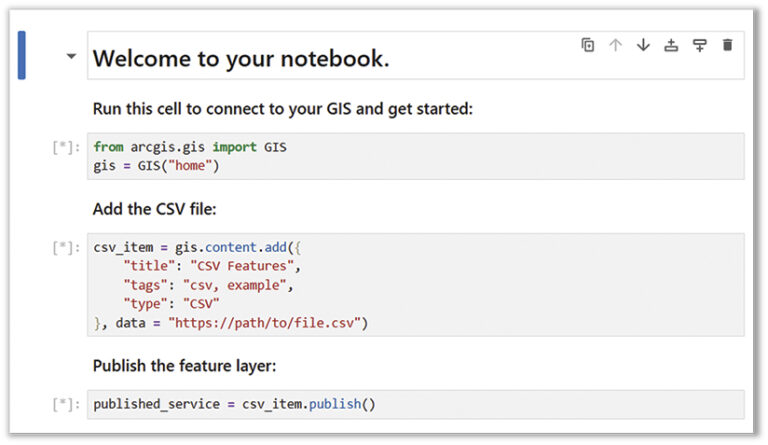
Solution: Try using ArcGIS Data Interoperability to connect to any data source. If you have Python expertise, consider using ArcGIS Notebooks.解决方案:尝试使用ArcGIS Data Interoperability连接任何数据源。如果您具备Python专业知识,可以考虑使用ArcGIS Notebooks。
The ArcGIS Data Interoperability extension for ArcGIS Pro offers even more integration options for nonnative data sources. It allows users to design data movement among hundreds of systems and apps using a visual programming interface. Data Interoperability works with both ArcGIS Online and ArcGIS Enterprise and can be added to Creator, Professional, and Professional Plus user type licenses.ArcGIS Pro的ArcGIS数据互操作扩展为非原生数据源提供了更多集成选项。它允许用户通过可视化编程界面设计数百个系统和应用程序之间的数据移动。数据互操作可与ArcGIS Online和ArcGIS Enterprise配合使用,并且可以添加到Creator、Professional和Professional Plus用户类型许可中。
ArcGIS Notebooks is another option for those who have experience with Python. Users can employ ArcGIS Python libraries—Python packages that include ArcPy and ArcGIS API for Python—to simplify automation and streamline tasks, including GIS administration, content management, and analysis. Notebooks can be used to write, run, and schedule Python code to integrate data with ArcGIS Enterprise and ArcGIS Online. Scripts that leverage the ArcGIS Python libraries can be written to run in external Python development environments. Python runtimes in Notebooks also integrate seamlessly with libraries from the open-source Python ecosystem that are required for data workflows.ArcGIS Notebooks 是有 Python 经验者的另一个选择。用户可以使用 ArcGIS Python 库(包括 ArcPy 和 ArcGIS API for Python 的 Python 包)来简化自动化操作和优化任务流程,其中包括 GIS 管理、内容管理和分析。Notebooks 可用于编写、运行和调度 Python 代码,以便将数据与 ArcGIS Enterprise 和 ArcGIS Online 集成。利用 ArcGIS Python 库编写的脚本可以在外部 Python 开发环境中运行。Notebooks 中的 Python 运行时还能与开源 Python 生态系统中数据工作流所需的库无缝集成。
Another option for ArcGIS Enterprise users comfortable with programming and wanting to integrate data without performing ETLs is to develop custom data feeds. These enable users to access and employ data from sources not natively supported in ArcGIS. The data remains in its source, and ArcGIS Enterprise reads and writes it to a feature service, enabling organizations to create feature layers that reference data from virtually any source—including proprietary REST APIs, public URLs, and databases such as MongoDB.对于熟悉编程且希望在不执行ETL(抽取、转换、加载)的情况下集成数据的ArcGIS Enterprise用户来说,另一个选择是开发自定义数据馈送。这使用户能够访问和使用ArcGIS原生不支持的数据源中的数据。数据保留在其源位置,ArcGIS Enterprise将其读取并写入要素服务,使组织能够创建要素图层,这些图层可以引用几乎任何来源的数据,包括专有REST API、公共URL以及MongoDB等数据库。
Whether your organization uses ArcGIS Online, ArcGIS Enterprise, ArcGIS Pro, or all three, many options are available to integrate data in a way that meets your organization’s needs.无论您的组织使用ArcGIS Online、ArcGIS Enterprise、ArcGIS Pro,还是同时使用这三者,都有多种选项可用于以满足组织需求的方式集成数据。










没有回复内容