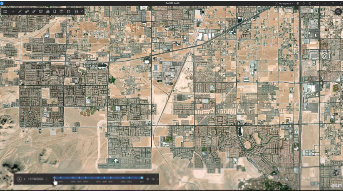

You asked, we answered. The ArcGIS Earth product team is excited to announce the release of the Historical Imagery Explorer, a new tool that lets you browse the Wayback Imagery archive using an interactive timeline widget. The challenge of manually browsing ArcGIS Online for Wayback Imagery tile layers, only to discover there’s no recent update in your area, is a thing of the past. 你提问,我们来解答。ArcGIS Earth 产品团队很高兴地宣布推出历史影像浏览器,这是一款新工具,可让你通过交互式时间轴组件浏览 Wayback 影像档案。过去那种需要手动在 ArcGIS Online 上浏览 Wayback 影像瓦片图层,结果却发现你所在地区没有最新更新的麻烦,如今已成为历史。
What is Wayback Imagery? 什么是Wayback影像?
Wayback imagery is a digital archive of the World Imagery basemap that enables you to access versions of World Imagery captured over the past 10+ years.Wayback影像库是全球影像底图的数字档案,它能让你访问过去10多年间拍摄的全球影像版本。
ArcGIS Earth Historical Imagery Explorer ArcGIS Earth 历史影像浏览器
ArcGIS Earth’s Historical Imagery Explorer leverages core functionalities to identify versions of the Wayback archive that contain updates based on your view extent and zoom level. As you navigate the globe, the interactive timeline widget dynamically updates, displaying only dates where relevant and updated imagery is available.ArcGIS Earth的历史影像浏览器利用核心功能,基于您的视图范围和缩放级别,识别包含更新内容的Wayback档案版本。当您在地球仪上导航时,交互式时间轴控件会动态更新,仅显示有相关且更新的影像可用的日期。
How Does it Work? 它是如何工作的?
While ArcGIS Earth is a .NET based application, it’s Historical Imagery Explorer draws heavy inspiration from the logic found in the wayback-core JavaScript library. The tool accesses the Wayback catalog through the ArcGIS Online Wayback Imagery group. ArcGIS Earth retrieves WMTS (Web Map Tile Service) data, including release dates, and dynamically displays imagery based on the specific timeframe you select. 虽然ArcGIS Earth是一款基于.NET的应用程序,但其历史影像浏览器的设计深受wayback-core JavaScript库中逻辑的启发。该工具通过ArcGIS Online的Wayback影像群组访问Wayback目录。ArcGIS Earth会检索WMTS(网络地图瓦片服务)数据(包括发布日期),并根据您选择的特定时间段动态显示影像。
Smart Filtering 智能过滤
The Wayback archive hosts a large number of releases, but not all of them include updates for the specific area you are viewing. To keep your experience smooth and relevant, the Explorer uses the Tile Map API to determine which imagery versions have tile data updates available for your current location.Wayback 档案库中存有大量版本,但并非所有版本都包含您正在查看的特定区域的更新。为了让您获得流畅且相关的体验,浏览器会使用瓦片地图 API 来确定哪些影像版本拥有当前位置的瓦片数据更新。
Here are a few things to know about how smart filtering behaves:以下是关于智能过滤机制的几点说明:
- Contextual Relevance: Imagery versions where no changes occurred are filtered out so you only see changes that matter to your current view. 上下文相关性:未发生变化的图像版本会被过滤掉,因此您只会看到与当前视图相关的变化。
- Altitude Limitation: To maintain performance, dynamic filtering begins when the camera is below 30km altitude. 高度限制:为保持性能,当相机处于30千米以下高度时,动态滤波启动。
- View Extent Accuracy: The tile at the center of your view extent is used as the representative sample for filtering which versions contain change. 视图范围精度:视图范围中心的瓦片用作代表性样本,用于筛选包含变更的版本。
Currently, the Historical Imagery Explorer focuses on the release dates of the World Imagery Basemap. However, the Wayback archive is rich with metadata. Each version of a tile can technically be queried to reveal its acquisition date, imagery provider, and spatial resolution. While ArcGIS Earth doesn’t query this metadata for every single image to keep things fast, we are looking into possible ways to expose this level of detail to you. 目前,历史影像浏览器主要关注世界影像底图的发布日期。然而,Wayback档案包含丰富的元数据。从技术上讲,每个瓦片版本都可以通过查询来显示其获取日期、影像提供商和空间分辨率。虽然ArcGIS Earth为了保证速度,不会对每一张图像都查询这些元数据,但我们正在研究可能的方法,以便向您展示这一详细程度的信息。
The Historical Imagery Explorer is available to the public and does not require a specific user type. 历史影像浏览器向公众开放,无需特定用户类型。
Explore Historical Imagery in ArcGIS Earth在ArcGIS Earth中探索历史影像
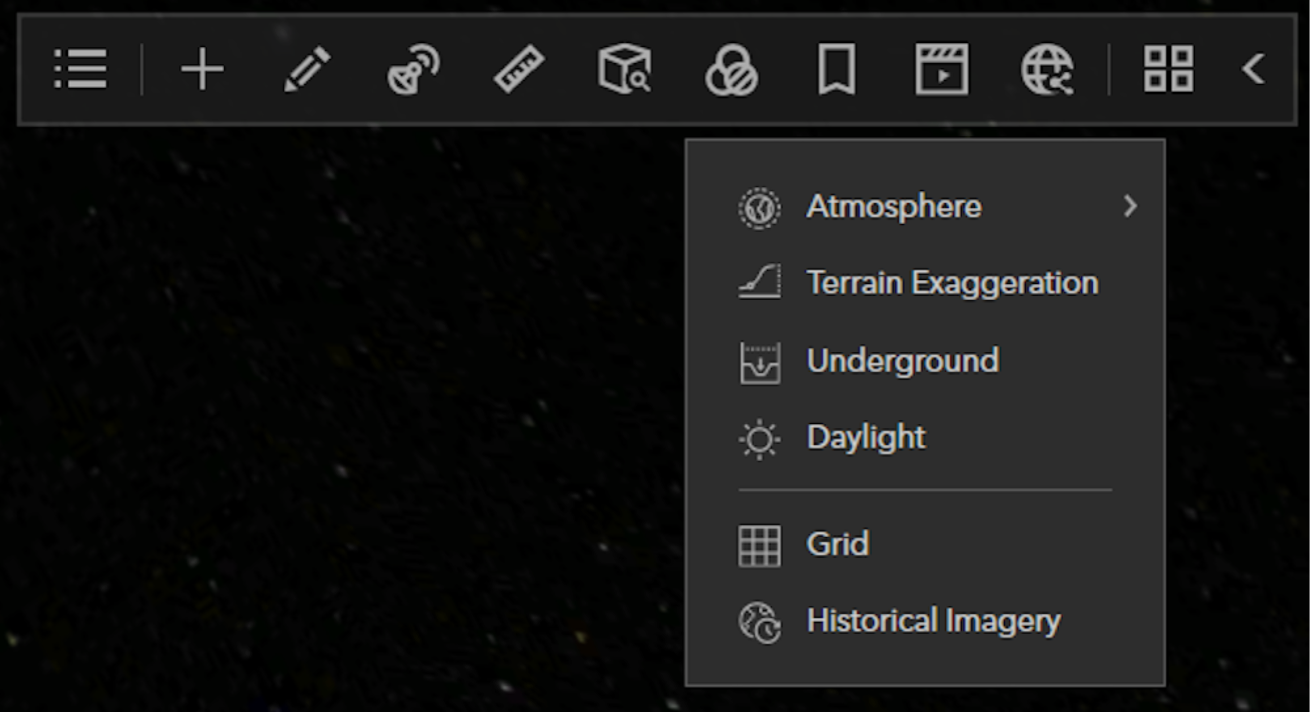
How to access the Historical Imagery Explorer 如何访问历史影像浏览器
You will find the Historical Imagery Explorer under 3D Effects in the main toolbar. The Historical Imagery Explorer is only supported when the spatial reference is set to Web Mercator. If the current scene is set to WGS84 the Historical Imagery Explorer will be unavailable. 您可以在主工具栏的“3D效果”下找到“历史影像浏览器”。只有当空间参考设置为Web Mercator时,“历史影像浏览器”才受支持。如果当前场景设置为WGS84,“历史影像浏览器”将无法使用。
Historical Imagery Explorer Interactive Timeline Widget历史影像浏览器 交互式时间线 小部件
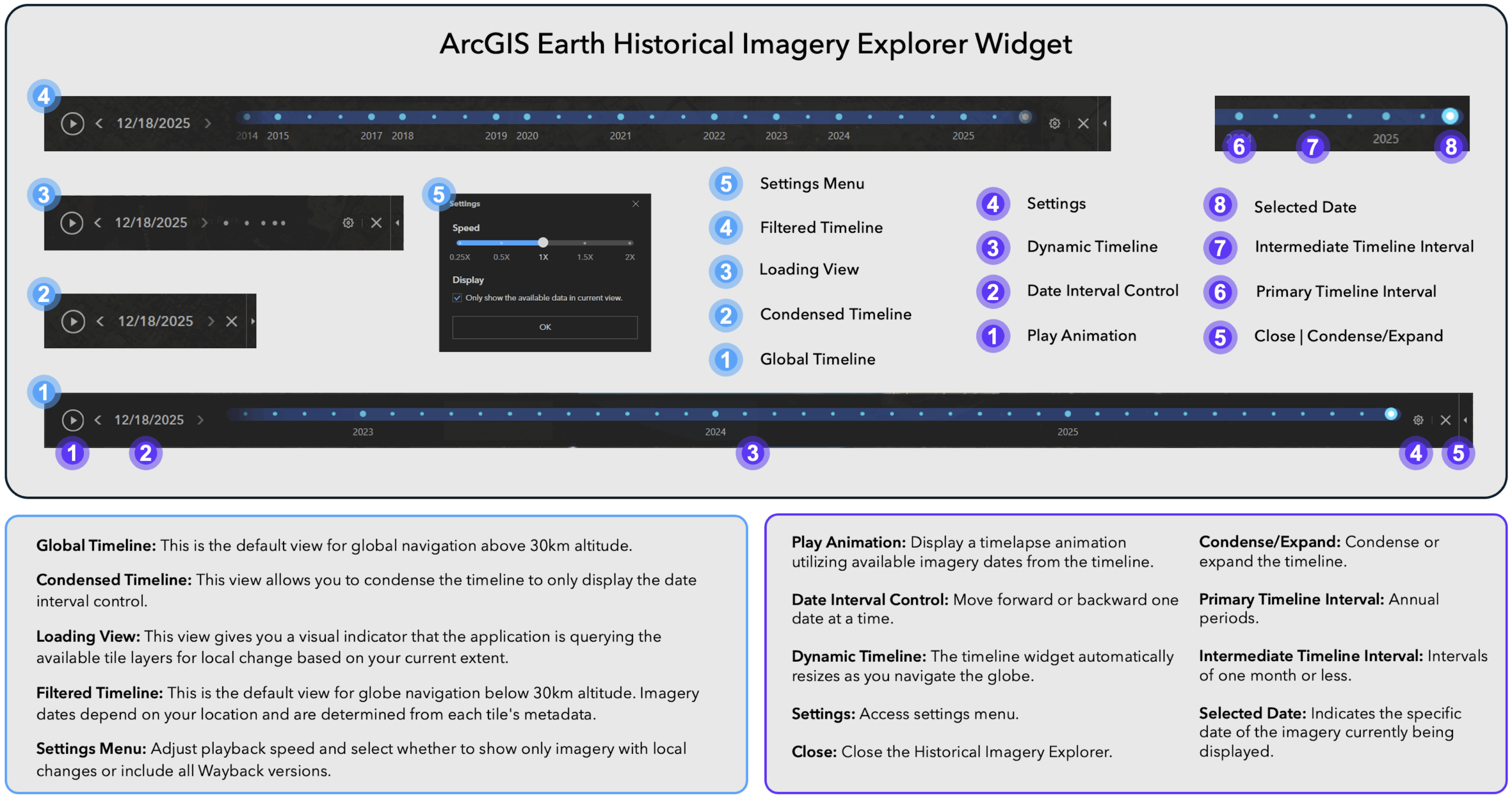
The Historical Imagery Explorer utilizes a dynamic timeline widget to simplify the identification of available imagery and enable efficient navigation across different dates.历史影像浏览器利用动态时间线组件简化可用影像的识别,并支持在不同日期之间高效导航。
See the diagram below for an overview of the user interface elements:参见下面的图表,了解用户界面元素的概述:
Historical Imagery Use Cases 历史影像用例
Environmental Change Examples 环境变化示例
Measure Glacier Retreat (Solheimajokull Glacier, Iceland) 测量冰川退缩(冰岛索尔黑马冰川)
The Solheimajokull Glacier in Iceland has experienced a retreat of several hundred meters in recent decades, serving as a clear example of the rapid impacts of climate change. With ArcGIS Earth’s Historical Imagery Explorer and line measurement tool, we can track changes in terminus position over time. 冰岛的索尔黑马冰川在近几十年里退缩了数百米,这清楚地展示了气候变化带来的快速影响。借助ArcGIS Earth的历史影像浏览器和线性测量工具,我们可以追踪冰川末端位置随时间的变化。
![图片[3]-ArcGIS Earth 桌面版新功能(2026年1月)-ArcGIS Earth论坛-软件-CityEngine城市引擎](https://www.esri.com/arcgis-blog/wp-content/uploads/2026/01/Glacier_Melt_Measure_Historical_Imagery-GIF.gif)
Monitor Deforestation and Illegal Mining Activity (Madre de Dios, Peru)监测森林砍伐和非法采矿活动(秘鲁马德雷德迪奥斯)
Since the 1980s, Madre de Dios has experienced a loss of over 130,000 hectares due to illegal gold mining. This activity has resulted in the destruction of pristine Amazon rainforest, mercury contamination of rivers, and significant threats to biodiversity hotspots. Using the Historical Imagery Explorer, you can clearly see the rapid growth of man-made gold mining plunge pools in the region.自20世纪80年代以来,马德雷德迪奥斯地区因非法金矿开采已损失超过13万公顷的土地。这种活动导致了原始亚马逊雨林的破坏、河流的汞污染,以及对生物多样性热点地区的严重威胁。通过“历史影像探索器”,你可以清晰地看到该地区人工金矿开采形成的矿坑池的快速扩张。
![图片[4]-ArcGIS Earth 桌面版新功能(2026年1月)-ArcGIS Earth论坛-软件-CityEngine城市引擎](https://www.esri.com/arcgis-blog/wp-content/uploads/2026/01/Madre_de_Dios_Deforestation_Gold_Mining-GIF.gif)
Track Flood Impact Over Time (Khagaria/Bihar, India)长期追踪洪水影响(印度比哈尔邦卡加里亚)
Bihar is India’s most flood-prone state, where seasonal floods often damage farms, uproot communities, and destroy infrastructure worth billions. Using ArcGIS Earth’s Drawing tools, combined with the Historical Imagery Explorer, you can collect buildings affected by flooding and save the layer as a KML/KMZ.比哈尔邦是印度洪涝灾害最频发的邦,季节性洪水常常毁坏农田、迫使社区迁移,并摧毁价值数十亿美元的基础设施。借助ArcGIS Earth的绘图工具,结合历史影像浏览器,你可以收集受洪水影响的建筑物,并将该图层保存为KML/KMZ格式。
![图片[5]-ArcGIS Earth 桌面版新功能(2026年1月)-ArcGIS Earth论坛-软件-CityEngine城市引擎](https://www.esri.com/arcgis-blog/wp-content/uploads/2026/01/Khairteya_Flood_Impacts-GIF2-1.gif)
Urban Expansion and Development Examples城市扩张与发展案例
Visualizing Urban Sprawl (Las Vegas, NV)可视化城市扩张(内华达州拉斯维加斯)
Las Vegas ranks among the fastest growing metropolitan regions globally. The expansion into desert areas alters the arid landscape and places significant pressure on available water resources. ArcGIS Earth’s Historical Imagery Explorer enables users to measure impervious surface area, monitor desert encroachment, and evaluate patterns of development within this water-limited environment.拉斯维加斯是全球发展最快的大都市区之一。向沙漠地区的扩张改变了干旱的地貌,并对现有的水资源造成了巨大压力。ArcGIS Earth的历史影像浏览器能让用户测量不透水地表面积、监测沙漠侵蚀情况,并评估这一水资源有限环境中的发展模式。
![图片[6]-ArcGIS Earth 桌面版新功能(2026年1月)-ArcGIS Earth论坛-软件-CityEngine城市引擎](https://www.esri.com/arcgis-blog/wp-content/uploads/2026/01/Las_Vegas_Urban_Development-GIF.gif)
Land Reclamation (Pulau Tekong, Indonesia)填海造地(印度尼西亚德光岛)
Pulau Tekong has seen major land reclamation efforts, using engineered fill to enlarge its coastal areas. These projects convert marine environments into land suited for infrastructure, military, or commercial use, causing significant changes to coastlines and marine ecosystems in Southeast Asia’s fast-growing regions. With ArcGIS Earth’s Historical Imagery Explorer you can create evidence of the pace and scale of engineered coastal changes, so that decision-makers can make informed decisions.德光岛进行了大规模的填海造地工程,利用人工填料扩大其沿海区域。这些项目将海洋环境转变为适合基础设施、军事或商业用途的土地,给东南亚快速发展地区的海岸线和海洋生态系统带来了显著变化。借助ArcGIS Earth的历史影像浏览器,你可以为人工海岸变化的速度和规模创建证据,以便决策者能够做出明智的决策。
![图片[7]-ArcGIS Earth 桌面版新功能(2026年1月)-ArcGIS Earth论坛-软件-CityEngine城市引擎](https://www.esri.com/arcgis-blog/wp-content/uploads/2026/01/Pulau_Tekong_Ponder_Reclaimed_Land-GIF2.gif)
Monitor Construction Projects (Courthouse Rd – Stafford, VA)监控建筑项目(法院路 – 弗吉尼亚州斯塔福德)
Stafford County’s Courthouse Road diverging diamond interchange uses an innovative design to ease congestion and boost safety. The intersection shifts traffic temporarily to the opposite side and demands careful planning for smooth construction. ArcGIS Earth’s Historical Imagery Explorer lets you quickly see images of the area before, during, and after construction.斯塔福德县的法院路分流菱形互通式立交采用创新设计来缓解拥堵并提高安全性。该交叉路口会暂时将车流引导至对向车道,这需要精心规划以确保施工顺利进行。ArcGIS Earth的历史影像浏览器能让你快速查看该区域在施工前、施工期间和施工后的图像。
![图片[8]-ArcGIS Earth 桌面版新功能(2026年1月)-ArcGIS Earth论坛-软件-CityEngine城市引擎](https://www.esri.com/arcgis-blog/wp-content/uploads/2026/01/Stafford_County_Traffic_Pattern_Update-GIF.gif)
What’s Next for the Historical Imagery Explorer in ArcGIS EarthArcGIS Earth中的历史影像浏览器接下来会有什么新功能
Historical Imagery Explorer on Mobile移动端历史影像浏览器
The Historical Imagery Explorer isn’t limited to ArcGIS Earth for Desktop. It will also become available in ArcGIS Earth for Mobile with the 2.6 version scheduled for release in February 2026.历史影像浏览器不仅限于桌面版ArcGIS Earth。它还将在计划于2026年2月发布的2.6版本移动版ArcGIS Earth中推出。
Future Enhancements 未来增强功能
A select group of customers who participated in early testing have already provided valuable suggestions for enhancing this new feature. See below:一群参与早期测试的精选客户已经为改进这一新功能提供了宝贵建议。详见下文:
- Support for time-enabled Mosaic Dataset based image services as a primary data source for the Historical Imagery Explorer tool.支持将启用时间的镶嵌数据集图像服务作为历史影像浏览器工具的主要数据源。
- Support for time-enabled image services published from various raster sources (Mosaic Dataset Raster, Cloud Raster Format, etc.) on ArcGIS Enterprise.支持从ArcGIS Enterprise上的各种栅格源(镶嵌数据集栅格、云栅格格式等)发布的启用时间的图像服务。
- Performance parity between WMTS and Mosaic Dataset based imagery sources.WMTS和基于镶嵌数据集的影像源之间的性能对等。
- Flexible metadata configuration allowing custom JSON metadata for time-enabled imagery catalogs.灵活的元数据配置,允许为支持时间的影像目录配置自定义JSON元数据。
- Identify tool to reveal image metadata (acquisition date, imagery provider, and spatial resolution). 确定用于显示图像元数据(获取日期、图像提供者和空间分辨率)的工具。
We invite you to provide your feedback on enhancing historical imagery in ArcGIS Earth by participating in the ArcGIS Earth Esri Community. Please indicate which of the proposed enhancements would benefit your organization or contribute additional suggestions. 我们邀请您通过参与ArcGIS Earth Esri 社区,就增强 ArcGIS Earth 中的历史影像提供反馈。请指出哪些拟议的增强功能对您的组织有益,或提出其他建议。
Download ArcGIS Earth to try the new Historical Imagery Explorer now. 立即下载ArcGIS Earth,体验全新的历史影像浏览器。
Closing 结尾
As we close out the 2.6 release, it is a perfect time to reflect on a year of meaningful impact for ArcGIS Earth throughout 2025. Across both desktop and mobile versions, our team focused on improving application stability and delivering powerful capabilities. We began the year by improving spatial orientation in 3D environments and visualization through 3D grid support, allowing for the display and customization of Latitude-Longitude, UTM, MGRS, and USNG grids. This was paired with the arrival of 3D basemaps, including support for high-resolution OpenStreetMap 3D buildings. The introduction of real-time stream services support enabled you to visualize and interact with dynamic, live data streams, complete with spatial filtering and the ability to track the moving entities in real time.随着2.6版本的发布收尾,现在正是回顾ArcGIS Earth在2025年一整年所产生的重大影响的绝佳时机。在桌面版和移动版中,我们的团队都专注于提升应用稳定性并提供强大功能。今年年初,我们通过支持3D网格来改进3D环境中的空间定位和可视化效果,能够显示和自定义经纬度、UTM、MGRS以及USNG网格。与此同时,3D底图也随之推出,包括对高分辨率OpenStreetMap 3D建筑物的支持。实时流服务支持的引入,让您能够可视化动态实时数据流并与之交互,还具备空间过滤功能以及实时跟踪移动实体的能力。
Field mobility has made notable advancements through the integration of high-accuracy external GNSS connectivity, available via Bluetooth for mobile devices and USB for laptops. Capturing GPS tracks in real-time with precision and accuracy has never been easier. We remained committed to empowering offline workflows by providing essential self-service downloading of map tiles across desktop and mobile, ensuring critical map data is available without internet connectivity. In addition, desktop received an enhancement that allows you to load and edit Survey123 surveys in disconnected environments. These added capabilities ensure seamless and productive field operations, regardless of connectivity.通过集成高精度的外部GNSS连接,野外移动性取得了显著进步,移动设备可通过蓝牙连接,笔记本电脑则可通过USB连接。实时捕捉高精度的GPS轨迹从未如此简单。我们始终致力于支持离线工作流程,通过在桌面端和移动端提供必要的地图瓦片自助下载功能,确保关键地图数据在没有网络连接的情况下也能使用。此外,桌面端还得到了一项增强功能,允许在断网环境下加载和编辑Survey123调查。这些新增功能确保了无论是否有网络连接,野外作业都能无缝且高效地进行。
Underpinning these capabilities were vital performance updates, such as optimized memory management and rendering speed for large KML and feature layers. We are proud to conclude 2025 with the launch of the Historical Imagery Explorer in version 2.6. From tracking live assets to uncovering the past, these new capabilities have made ArcGIS Earth a more versatile and powerful tool for exploring our changing world. 支撑这些功能的是关键的性能更新,例如针对大型KML和要素图层的优化内存管理及渲染速度。我们很自豪能在2025年年底推出2.6版本中的历史影像浏览器。从追踪实时资产到探索过去,这些新功能让ArcGIS Earth成为探索我们不断变化的世界的一个更具多功能性且更强大的工具。








没有回复内容